AI Tool Consultant

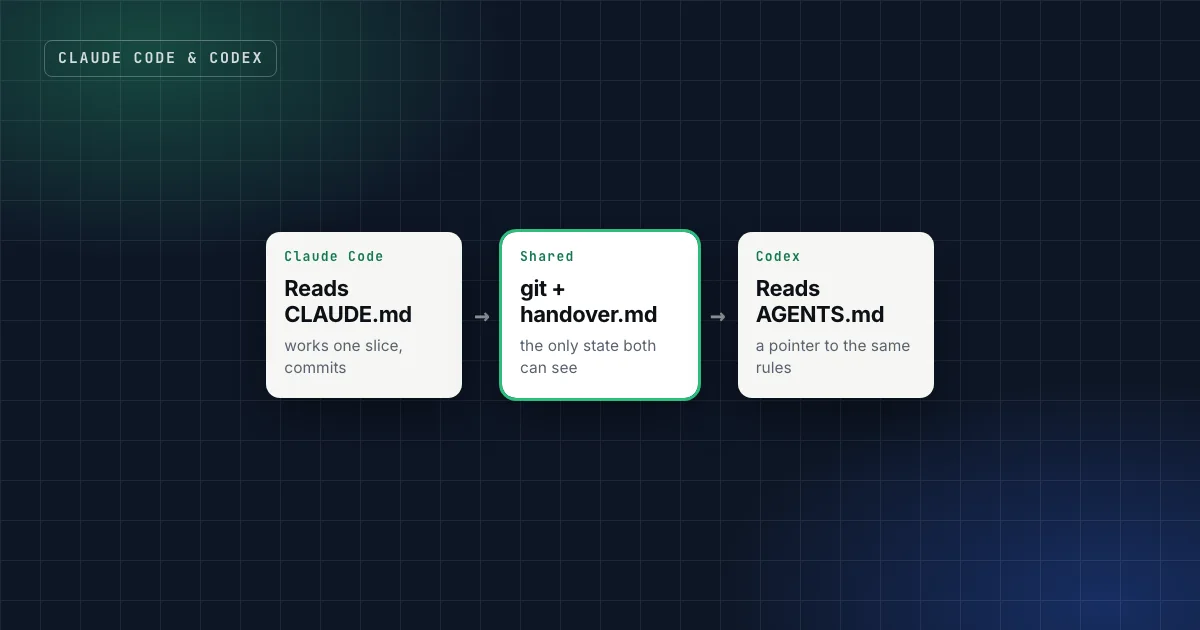
I built a German-for-work practice app with Claude Code and Codex taking turns on the same repository. It worked, after one realization that shaped everything else: the two agents can't read each other's chats or memory. Git and one handover file are the only state they share. Everything else, like a decision made in a Claude Code chat or a preference stored in Codex's memory, is invisible to the other agent.
So using Claude Code and Codex together isn't really about the tools. It's about making the repository itself carry the context: one rulebook, one handover file, clear lanes, and a rule for who works when.
At a glance
- One canonical guide. Keep one rulebook. Claude Code reads
CLAUDE.md, Codex readsAGENTS.md; make one of them point to the other.1 2 - One handover file that both agents read at the start and write at the end of every session.
- Pick an operating model: alternate on one branch, or give each agent its own repository or git worktree. Never two agents in one working tree at once.3
- Fence what matters: files an agent must not touch, the working branch, and "no push without approval".
- Use the second agent as a reviewer in fresh context, not only as a second pair of hands.3
Why use two coding agents at all?
Not because one is "better". There's no honest universal answer to that, and it changes with every model release. The practical reasons are more mundane:
- Availability. When you hit a usage limit or an outage in one tool, the work can continue in the other, if the repository carries the context.
- A second opinion. A fresh agent reviewing a diff isn't biased toward code it just wrote. Anthropic's own best-practices guide recommends a writer/reviewer split for exactly that reason.3
- Different strengths for different tasks. Each tool has its own features: Claude Code has skills, hooks and subagents; Codex has its own skills, cloud tasks and integrations. Use whichever fits the task.
All three only work if switching is cheap. That's what the rest of this setup is for.
CLAUDE.md vs AGENTS.md: which file is the rulebook?
Each tool reads its own instruction file at the start of a session:
- Claude Code reads
CLAUDE.mdfiles in your working directory and above it.1 Since version 2.1.277 it can also readAGENTS.mddirectly, but by default only when there's noCLAUDE.mdin your working directory or above it.1 - Codex reads
AGENTS.md: a global one in its home directory, then one per directory from the project root down to where you're working, with files closer to your working directory taking precedence.2 - AGENTS.md is an open format, now stewarded by the Agentic AI Foundation under the Linux Foundation, and supported by tools including Codex, Cursor, GitHub Copilot's coding agent and Gemini CLI.4
The trap is ending up with two rulebooks that slowly disagree. Pick one file as canonical and make the other a pointer:
| Setup | How | Good when |
|---|---|---|
| CLAUDE.md canonical | AGENTS.md contains one paragraph: "The rules for this repository are in CLAUDE.md. Read it, then the newest entry in docs/handover.md." | You started with Claude Code and use Claude-specific features in CLAUDE.md |
| AGENTS.md canonical, imported | CLAUDE.md contains @AGENTS.md, which Claude Code expands at launch.1 | Several tools besides Claude Code use the repository |
| AGENTS.md only | No CLAUDE.md at all; Claude Code reads AGENTS.md by default (v2.1.277+).1 | You want one file and nothing Claude-specific |
The setup in this site's coding-agent pack uses the first option: CLAUDE.md is the canonical guide and AGENTS.md is a thin pointer. The import option is just as good. What matters is that a rule exists in exactly one place.
Practical takeaway
Open both files today. If they contain the same rules written twice, they'll drift. Keep the rules in one, and reduce the other to a pointer or an import.
Put "current work" at the top of the guide
The first section of the canonical guide should answer the questions any agent asks when it arrives: which branch, which plan, which handover file, and who owns what. For example:
## 0. Current work and handover
- Branch: feature/practice-cap. Never work on main.
- Plan: docs/plan.md. Handover: docs/handover.md (newest entry first).
- Read the newest handover entry and `git log` since it before any edit.
- One agent at a time. End every session with a commit and a handover entry.
- Fenced: src/data/ and the prompt contract. No push without the owner's OK.
Because Claude Code loads CLAUDE.md at launch and Codex loads AGENTS.md,1 2 both agents see this before they do anything.
Choose an operating model
There are only three ways two agents can share a project, and one of them doesn't work:
| Model | When | Rules |
|---|---|---|
| Alternating on one branch | One product, switching tools | One agent at a time. Start from a clean tree that matches the remote; end with a commit and a handover entry. |
| One agent per repository or worktree | Two tracks in parallel | Each has its own branch and checkout. Git worktrees give each session an isolated checkout of the same repository.3 Bring changes across deliberately, never by merging wholesale. |
| ~~Two agents in one working tree~~ | Never | They overwrite each other's files and fight over dev-server ports. |
The handover rules both agents follow
With alternating sessions, the handover file carries everything. The rules that kept it reliable:
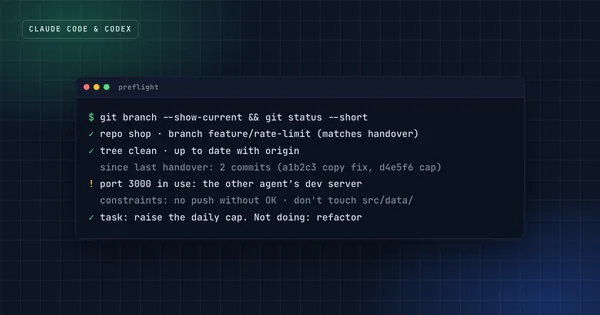
- One agent at a time. Start from a clean tree that matches the remote. If you find uncommitted work you didn't make, stop and ask.
- Read before working: the newest handover entry, then
git logsince it. - One concern per batch, ending with verification, a commit and a new handover entry.
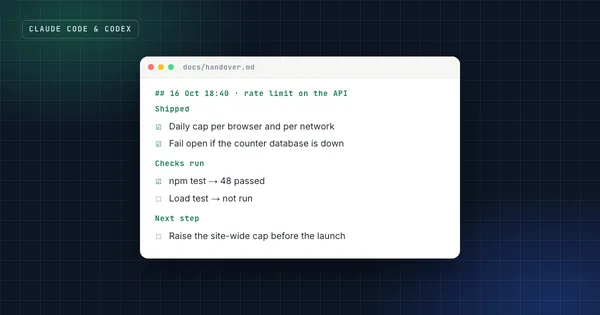
- Every entry opens with a plain summary for the owner: what changed in the product, what needs to be running, what to try.
- Decisions go in the plan file, dated and attributed, never only in a chat.
- Say what you ran on the owner's machine, and stop what you started before handing over.
- New settings go in
.env.example. Secrets never appear in chat, docs or commits.
The entry template and the start-of-session preflight are covered in the Claude Code handover guide and the two-minute session checklist. Both are free skills in this site's starter kit, and they work in Claude Code and Codex alike.
Fence the dangerous parts
Two agents means twice as many chances for a confident mistake. Write the boundaries down:
- Fenced files: the data model, the prompt contract, another track's folder. Name them in the guide.
- Branches: name the working branch, and never merge
maininto it unless told to. Turn on branch protection formain. - Destructive operations such as deleting branches, force-pushing or switching production run only from a written runbook, on the owner's explicit go.
- Deploys: on platforms like Vercel, a push to a non-production branch builds a preview deployment.5 Treat a push as a deployment.
- Ports: note which dev-server port belongs to which agent.
In Claude Code you can turn the most important of these into hooks, which run deterministically, unlike instructions in CLAUDE.md.3
Use the second agent as a reviewer
The most underrated benefit of two agents is review. Anthropic's best-practices guide describes a writer/reviewer pattern: one session implements, a second session with fresh context reviews the change, and the first addresses the feedback. It notes that a fresh context improves review "since Claude won't be biased toward code it just wrote".3
Across tools, the same pattern works with even more distance: Codex reviews what Claude Code wrote, or the other way round. Give the reviewer the diff, the plan and the criteria ("every requirement implemented, edge cases tested, nothing outside the task changed"), and ask it to report gaps rather than style preferences.
Check the setup in one minute
Start a fresh session in each agent and ask the same question: "What are you allowed to change, and where do you hand over?" Both should answer the same thing, from the files. If they don't, one of your guides is out of date, and you found out before it cost you a session.
FAQ
Which is better, Claude Code or Codex?
It depends on the task, the model versions of the month and your usage limits, and any ranking goes stale quickly. Try both on a real task in your own repository. With the setup above, switching is cheap enough that you don't have to pick one. If you do have to pick, my Claude Code vs Codex comparison puts the plans, usage limits and benchmarks side by side.
Can Claude Code and Codex work at the same time?
Yes, in separate checkouts: separate repositories or separate git worktrees, each on its own branch and dev-server port. Not in the same working tree.
Do I need both CLAUDE.md and AGENTS.md?
No. Claude Code can read AGENTS.md when there's no CLAUDE.md,1 so one AGENTS.md can serve both. Keep a CLAUDE.md if you use Claude-specific instructions, and make one of the two files point to the other.
Does this work with Cursor too?
Yes. Cursor supports AGENTS.md,4 and it reads skills from .claude/skills/ and .agents/skills/, so the same guide, handover file and skills work there as well.
Sources
- How Claude remembers your project, Claude Code documentation.
- Custom instructions with AGENTS.md, OpenAI documentation for ChatGPT and Codex.
- Best practices for Claude Code, Claude Code documentation.
- AGENTS.md, stewarded by the Agentic AI Foundation.
- Environments: preview deployments, Vercel documentation.
Claude Code & Codex Workflow
Run two coding agents on real products without losing the thread, or your secrets.
Get the free starter kit
Four complete skills for Claude, Claude Code and Codex: handover, session start, social captions and an honest exam-prep tutor. Free, so you can judge the standard.