 AI Tool Consultant
Claude writes the format, not the lessons
Ask Claude for a skill and you get its default approach, tidied up. That's what it would have done anyway, so nothing changes.
Each skill installs a complete workflow, plus the checks people usually learn the hard way: the spreadsheet tab nobody read, the number nobody re-derived, the internal file a website kept serving. Install once, then just ask.
Works with
Because the part that matters is the part Claude doesn't know yet.
Ask Claude for a skill and you get its default approach, tidied up. That's what it would have done anyway, so nothing changes.
Every rule here exists because a real run failed: a sheet nobody read reversed a conclusion, a "better" score came from server drift, a private repo's site served internal plans.
That's what you're buying: failures someone already had, written as instructions, scripts and templates your AI follows every time.
One-time price per pack. All 27 skills for €129. Checkout opens soon.
Write in a real person's voice, report what LinkedIn actually did, and run outbound that doesn't burn your domain.
Keyword research from evidence, one URL per keyword, and articles where every claim has a source.
The daily method behind months of measured German progress, as skills Claude can run for you.
Report AI results you never have to retract.
Run two coding agents on real products without losing the thread, or your secrets.
The same standard as the paid packs, so you can judge the quality before you buy anything.
End every AI coding session with a handover the next session can act on cold.
A two-minute preflight so the agent works in the right repo, branch and scope.
Platform-native captions for Instagram, TikTok, YouTube Shorts and LinkedIn, checked against current limits.
Exercises first, honest scores, and a record that never invents progress.
A skill switches on when your request matches it. "Do the monthly LinkedIn report" is enough.
Or start with the free kit. Every skill page says exactly what it does and what it needs.
A Claude Code plugin, a zip for Claude.ai, or a folder for Codex. Two minutes.
The skill brings its workflow, scripts and checks. You review the result.
The operating system behind every skill here, and behind the products they came from. Read the field note →
Product reasoning and task design happen in a separate session from the code.
One reviewable change with explicit non-goals and files to inspect.
Claude Code or Codex make targeted edits and run the checks.
Real browser, nonsense input, cheap guards before expensive model calls.
Files, checks, decisions, risks and the next step, so the next session starts clean.

I'm a founder and operator. I build AI products (myberuf, a German-for-work practice app), work on growth and AI operations at a B2B start-up, and ran a local-LLM evaluation project during my Master's. These skills are the checklists I wish I'd had at the start: one builder's operating desk, not an agency.
Guides to Claude Skills, coding agents and AI search, written from real builds. All articles →
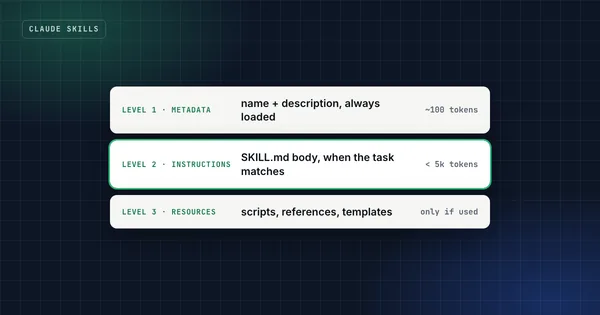 Claude Skills
What Are Claude Skills? How Agent Skills Work (2026 Guide)
Claude Skills are folders of instructions, scripts and checks that Claude loads when a task needs them. How they work, where they run, which to use.
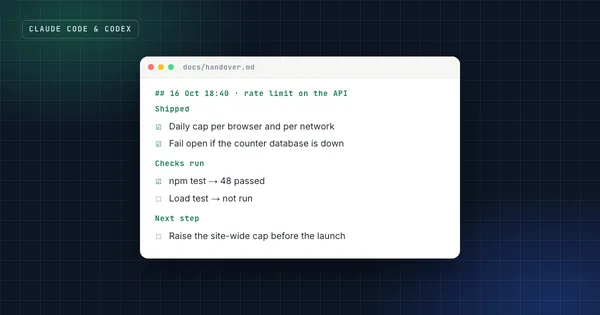 Claude Code & Codex
The Claude Code Handover: End Every Session With a File the Next One Can Act On
A Claude Code handover is the file a fresh session reads first. The template, the rules behind it, and a ready-to-paste prompt for the next chat.
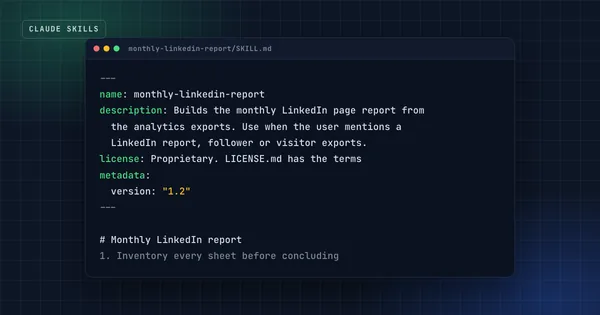 Claude Skills
SKILL.md Format Explained: Frontmatter, Folder Structure and Examples
SKILL.md field by field: frontmatter rules, extra fields Claude Code accepts and Claude.ai rejects, folder structure, limits and a full example.
Soon: checkout isn't open yet. Follow on LinkedIn to hear when it opens.
Claude can write the format of a skill in a minute, but only from what it already knows. A skill generated from a prompt contains Claude's default approach, the same thing it would have done without the skill, so nothing changes.
These skills are worth something because they override those defaults with checks that came from real failures: the spreadsheet tab nobody read, the improvement that was really server drift, the internal file a website kept serving. You can't ask for a check you don't know you need. That's what you're buying.
Claude.ai and Claude Desktop (upload a zip), Claude Code (plugin or folder), Codex (folder), and other agents that read the open SKILL.md format. A few skills include Python scripts; each skill page lists exactly what it needs.
In Claude Code, add the private marketplace you're invited to after purchase and install the pack with one command. For Claude.ai and Claude Desktop, turn on code execution in Settings → Capabilities, then upload one zip per skill under Customize → Skills. For Codex, copy the skill folders into ~/.agents/skills/. Then ask normally; a skill switches on when your request matches it.
Yes. In Claude Code, turn on auto-update for the marketplace (/plugin → Marketplaces), or update a pack with claude plugin update <pack>@aitoolconsultant. Zip buyers can download the latest version from their purchase page.
Yes, for your own work and for client work you do. You can share a pack inside one team of up to five people at one company. Please don't resell or publish the files.
No. They're independent skills that follow the open Agent Skills (SKILL.md) format, built and maintained by one person.
No. Skills are instructions and scripts that run inside your own AI tool. Nothing is sent to us.
Handover, session start, social captions and an honest exam-prep tutor, free in exchange for your email.