AI Tool Consultant

A whole session of work once landed on the wrong branch: the agent created a new branch instead of using the agreed one, and everything it built went there. It was recoverable only because every change had been committed cleanly.
That's the case for a Claude Code session checklist: a two-minute preflight before the agent edits anything. It confirms the repository, the branch, the state of the working tree and the latest handover, and it costs less than reading one wrong diff.
At a glance
- Run the preflight before any edit: repository, branch and worktree, uncommitted changes, sync with the remote, recent commits, the agent guide and the newest handover entry.
- If there are changes you didn't make, stop and ask. Don't stash, reset or commit someone else's work.
- Report in five lines or fewer, then restate the task with its non-goals and the checks you'll run at the end.
- If work landed on the wrong branch: don't delete anything, cherry-pick the commits onto the intended branch, re-run the checks, and keep the wrong branch until the owner confirms.
- The free starter kit's
coding-agent-session-startskill runs this whenever you say "start", "continue" or "where were we".
Why do coding sessions go wrong in the first five minutes?
Because a coding agent acts on whatever it finds, and it finds things quickly. In the first minutes of a session, it decides which repository it's in, which branch to work on and what state the code is in. A human would notice that the branch name looks odd or that there are uncommitted files from yesterday. An agent will often just start.
The common failures are all cheap to prevent and expensive to undo:
- Wrong branch. Work happens on
main, on a stale branch, or on a new branch the agent invented. - Someone else's changes. Uncommitted files from another session or another agent get stashed, overwritten or committed under the wrong message.
- Out of sync. The local branch is behind the remote, so the agent rebuilds something that already exists.
- Busy ports and running jobs. Another agent's dev server already holds port 3000, and a second one starts on 3001 without anyone noticing which is which.
- A push that deploys. On Vercel, every push to a non-production branch builds a preview deployment, and whether that preview is public depends on your Deployment Protection settings.1
The preflight, step by step
These are the eight steps of the free coding-agent-session-start skill. Steps 1 to 5 are git commands any agent can run; steps 6 to 8 are reading and thinking.
- Repository.
git rev-parse --show-toplevel. If several repositories are involved, confirm which one may be edited, and treat the others as read-only context. - Branch and worktree.
git branch --show-currentandgit worktree list. Compare them with what the agent guide or the newest handover says. - Uncommitted work.
git status --short. If there are changes you didn't make, stop and ask. - Sync.
git fetch, thengit status -sb. Pull only with--ff-only, and only if the guide allows it. - History since the handover.
git log --oneline -10. Note anything committed after the newest handover entry. - Guide and handover. Read the whole agent guide (
CLAUDE.mdorAGENTS.md) and the newest handover entry. List the constraints: fenced files, push rules, ports in use, models or services that must not change. - What's running. Before starting a dev server, check the port, for example with
lsof -i :3000. - Restate the task in one sentence, with what you're not doing and the checks you'll run at the end.
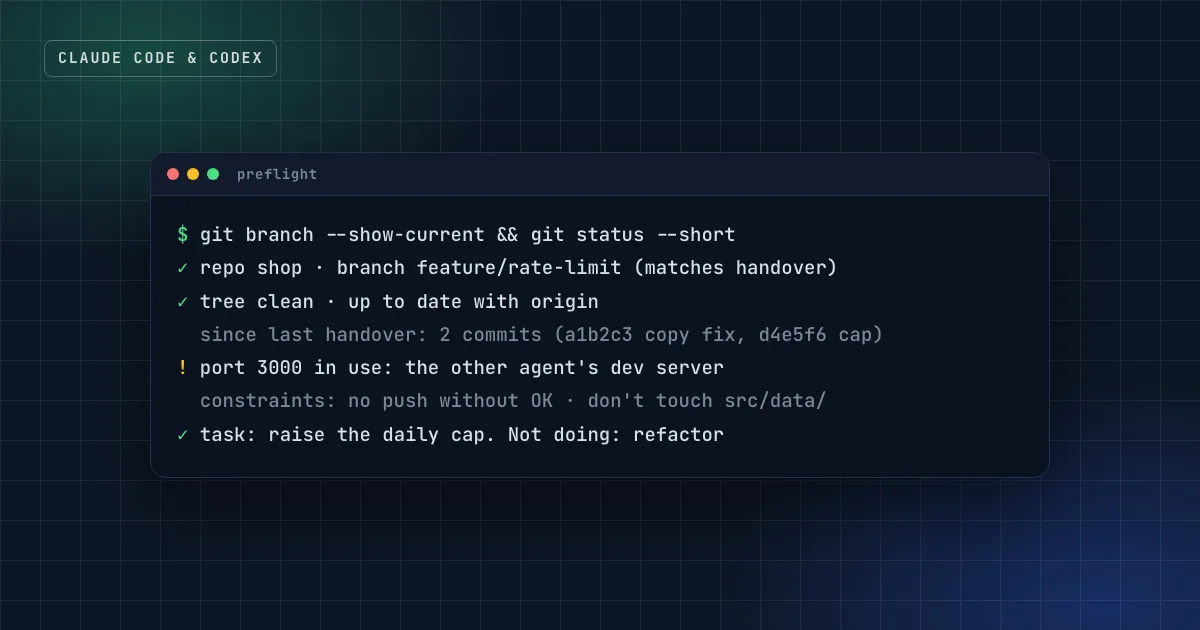
The report that comes out of it should fit in five lines:
Preflight: repo shop, branch feature/rate-limit (matches handover ✓), tree clean ✓, up to date ✓
Since last handover: 2 commits (a1b2c3 fix login copy, d4e5f6 add rate limit)
Constraints: no push without OK; don't touch src/data/; port 3000 belongs to the other agent
Task: raise the site-wide daily cap. Not doing: refactoring the counter. Checks: npm test, one manual sign-up
The point of the report isn't ceremony. It's that you, the owner, can read four lines and see a wrong branch or a surprise commit before the agent builds on it.
Practical takeaway
The preflight finds problems; it doesn't fix them. If the branch doesn't match or the tree is dirty, the right move is to report and ask, not to "clean up". Cleaning up someone else's work is how it gets lost.
What should the agent do if the tree is dirty?
Stop. Uncommitted changes the agent didn't make belong to someone: another session, another agent, or you. The tempting commands are the dangerous ones:
| Tempting command | What it does to someone else's work |
|---|---|
git stash | Hides it. Often forgotten, sometimes dropped later. |
git reset --hard | Deletes uncommitted changes to tracked files. Gone. |
git clean -fd | Deletes untracked files and folders. Gone. |
git commit -am "wip" | Commits it under a message that means nothing, mixed with new work. |
git push --force | Rewrites shared history on the remote. |
The checklist's rule is simple: never run git reset --hard, git clean -fd or git push --force without explicit approval. You can also enforce this in Claude Code rather than relying on instructions. Hooks run as scripts at fixed points and are deterministic, unlike instructions in CLAUDE.md, which are advisory.2 A PreToolUse hook that blocks those commands makes the rule hold even in a long session.
How to recover when work landed on the wrong branch
If the commits exist, nothing is lost. The recovery is calm and mechanical:
- Don't delete anything. Committed work is safe as long as the branch exists.
- List the commits:
git log --oneline <wrong-branch> -n 20. - Switch and replay:
git switch <intended-branch>, thengit cherry-pick <sha>for each commit, oldest first.3 - Re-run every check on the intended branch. Tests that passed on the wrong base can fail on the right one.
- Push only the intended branch, and only if pushing is allowed.
- Keep the wrong branch until the owner confirms everything moved. Delete it only with their OK.
- Write it down. Add one line to the agent guide: "All work happens on
<branch>."
Put the rules where every session reads them
A checklist that lives only in your head runs only when you remember it. Two places make it automatic:
- The agent guide. Claude Code reads
CLAUDE.mdat the start of every session, and Codex readsAGENTS.md.4 5 A short section at the top ("Current work: branchfeature/rate-limit. Read the newest entry indocs/handover.mdfirst. Never push without approval.") gives every session the same starting point. - A skill. The
coding-agent-session-startskill in the free starter kit runs the preflight and writes the report whenever you start, resume or switch tools. Its partner,coding-agent-handover, writes the entry the next preflight reads. The handover side is explained in the Claude Code handover guide.
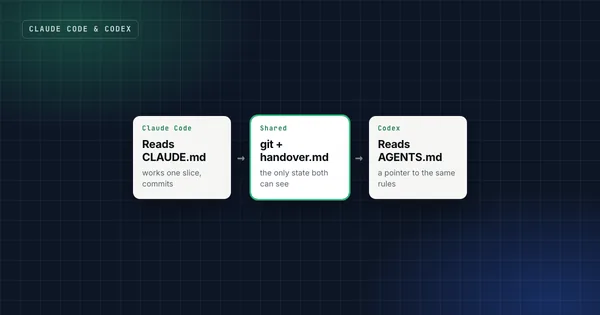
If you run Claude Code and Codex on the same project, the two guides need to point at the same handover file, or each agent will follow a different truth. The setup is in how to use Claude Code and Codex together.
FAQ
Isn't this overkill for a solo project?
It takes two minutes, and the failure it prevents can cost a whole session. On a solo project the "other person" is usually you from yesterday, with uncommitted changes and a dev server still running.
Should the agent pull from the remote automatically?
Only with --ff-only, and only if the guide allows it. A fast-forward pull can't create merge conflicts or rewrite anything; if it fails, that's information the owner needs.
Can I run the preflight with a Claude Code hook instead?
Partly. A hook can run the git commands and print the result at the start of a session. Reading the guide, comparing it with the handover and restating the task still needs the model, so a skill or an instruction in CLAUDE.md covers that half.
Does this work in Codex and Cursor?
Yes. The commands are plain git, and the skill uses the open SKILL.md format, so it runs in Codex, Cursor and other agents that read skills.
Sources
- Environments: preview deployments, Vercel documentation.
- Best practices for Claude Code: set up hooks, Claude Code documentation.
- git-cherry-pick, Git documentation.
- How Claude remembers your project, Claude Code documentation.
- AGENTS.md, a format for guiding coding agents, stewarded by the Agentic AI Foundation.
Get the free starter kit
Four complete skills for Claude, Claude Code and Codex: handover, session start, social captions and an honest exam-prep tutor. Free, so you can judge the standard.