AI Tool Consultant

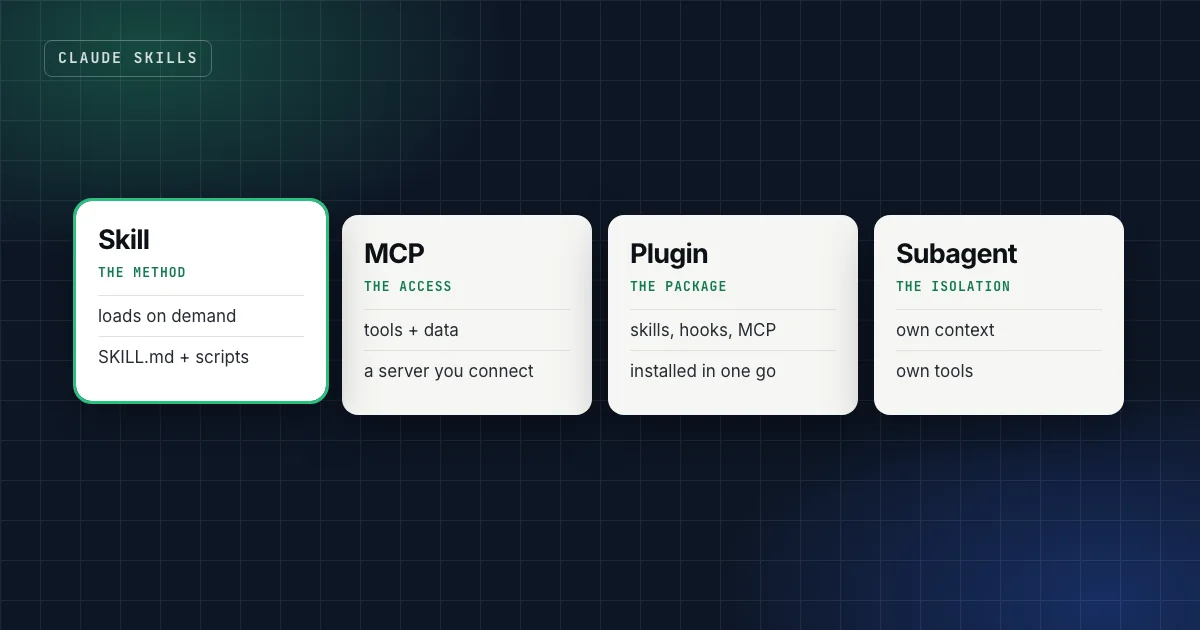
"Should this be a skill or an MCP server?" is one of the most common questions about Claude, and it has a short answer: a skill teaches Claude how to do something; an MCP server gives Claude access to something. Most real setups need both, plus a few of the other pieces.
This guide compares Claude Skills vs MCP, plugins, subagents, CLAUDE.md, projects and hooks: what each one is, when it loads, and when to use it. The definitions come from Anthropic's and the MCP project's own documentation, linked at the end.
At a glance
- Skill: a folder with instructions, scripts and checks for one job. Loads only when a task matches.
- MCP server: a connection to an outside system (files, databases, apps) that exposes tools and data.
- Plugin: a package that bundles skills, hooks, subagents and MCP servers into one install.
- Subagent: a separate assistant with its own context window, tools and permissions, for work you want isolated.
- CLAUDE.md and projects: standing context that's always loaded. Hooks: scripts that run every time, with no exceptions.
The short answer, in one table
| What it is | When it loads | Use it for | Don't use it for | |
|---|---|---|---|---|
| Skill | Instructions, scripts and references for one job | When a request matches its description1 | Repeatable methods with checks | Live data, permanent rules |
| MCP server | A standard connection to an outside system2 | When Claude calls one of its tools | Reading and acting on real systems | Teaching a process |
| Plugin | A bundle of skills, hooks, subagents and MCP servers3 | Whatever it contains, as above | Sharing a complete setup with a team | A single instruction |
| Subagent | An assistant with its own context window, tools and permissions4 | When Claude delegates, or you ask | Verbose research, independent review | Work that needs the main conversation's context |
| CLAUDE.md / project instructions | Standing instructions for a repo or workspace | Every session5 | Facts that are always true: commands, conventions | Procedures you need only sometimes |
| Hook | A script at a fixed point in Claude Code's workflow | Every time its event fires3 | Rules that must hold without exceptions | Anything that needs judgment |
What's the difference between Claude skills and MCP?
The MCP project describes itself as "an open-source standard for connecting AI applications to external systems", and compares it to "a USB-C port for AI applications".2 An MCP server exposes tools (actions), resources (data) and prompts that a client like Claude, ChatGPT, VS Code or Cursor can use.
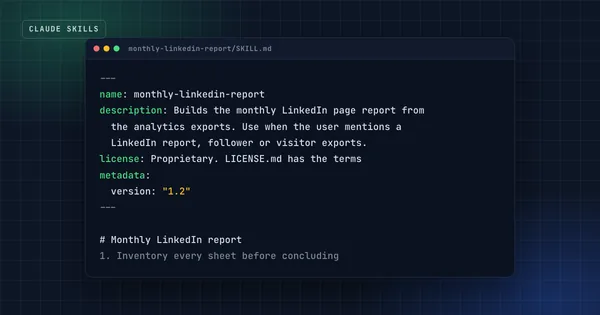
A skill, in Anthropic's words, packages "procedural knowledge": workflows, context and best practices that turn a general-purpose agent into a specialist.1 It doesn't connect to anything by itself. It tells Claude how to do the job well.
So they answer different questions:
- MCP: Can Claude reach it? Your calendar, your database, your design files, a search API.
- Skill: Does Claude know how we do this? Which checks to run, what order, what the output looks like, which mistakes to avoid.
They combine well. A skill can call an MCP server's tools, and Anthropic's authoring guide recommends naming them in full, as ServerName:tool_name, so Claude finds the right tool when several servers are connected.6 The server provides the access; the skill provides the method.
Practical takeaway
If you're about to write a skill that mostly explains how to call an API, check whether an MCP server for it already exists. Then write a short skill that says when and why to use it, with your team's rules.
Skills vs subagents: same context or a separate one?
This is the distinction that matters in Claude Code. Anthropic's documentation describes subagents as specialized assistants where "each subagent runs in its own context window with a custom system prompt, specific tool access, and independent permissions". The subagent does the work in its own context and "returns only the summary".4
Skills, by contrast, run in the main conversation. The documentation draws the line itself: use skills "when you want reusable prompts or workflows that run in the main conversation context rather than isolated subagent context".4
| Choose a subagent when | Choose a skill when |
|---|---|
| The work reads a lot of files you don't need to see | The result should shape the current conversation |
| You want a fresh opinion, like a review of a diff | You want a fixed method applied to the current task |
| The task needs different tools or tighter permissions | The task uses the tools you already have |
They also combine: a subagent can preload skills through its skills field.4 A review subagent that loads your team's review checklist as a skill is a good example.
Skills vs plugins: a skill is a part, a plugin is a package
In Claude Code, a plugin bundles "skills, hooks, subagents, and MCP servers into a single installable unit".3 You install it from a marketplace with one command, and updates arrive through the same marketplace.
That makes plugins the distribution format, not a different kind of capability. If you write one skill for yourself, a folder in ~/.claude/skills/ is enough. If you want a team to get five skills, two hooks and an MCP server configured the same way, and keep getting your updates, ship a plugin. Plugin skills are namespaced, so /my-plugin:review never collides with someone's local review skill.1 7
Skills vs CLAUDE.md, projects and custom instructions
These are the always-on layer. CLAUDE.md is read at the start of every Claude Code session.5 Projects in Claude.ai give every chat in a project the same instructions and knowledge files.8 Custom instructions do the same for all your chats.
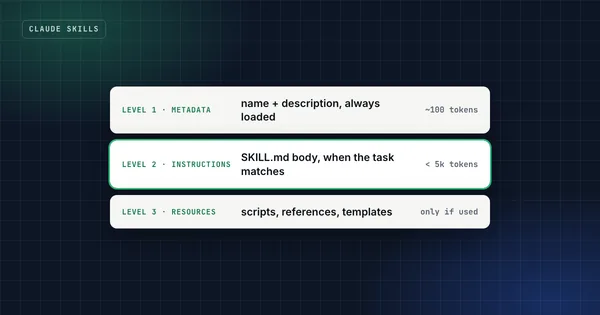
Because they're always loaded, they compete for context with everything else. Anthropic recommends keeping each CLAUDE.md under 200 lines,5 and its best-practices guide is explicit about the split: "For domain knowledge or workflows that are only relevant sometimes, use skills instead. Claude loads them on demand without bloating every conversation."3
A practical rule: if it's true every time, put it in CLAUDE.md or the project instructions. If it's a procedure for a particular job, make it a skill.
Skills vs hooks: advice or enforcement?
Everything above is guidance the model weighs. Hooks are different. They're scripts that run automatically at specific points in Claude Code's workflow, and Anthropic describes them as "deterministic", unlike CLAUDE.md instructions, which are "advisory".3
If something must happen every time with zero exceptions (run the linter after every edit, block writes to the migrations folder, refuse git push --force), make it a hook. If it needs judgment (is this claim sourced well enough?), keep it in a skill.
What happened to slash commands?
In Claude Code they were merged into skills. A file at .claude/commands/deploy.md and a skill at .claude/skills/deploy/SKILL.md both create /deploy, and existing command files keep working.1 The skill version adds a folder for supporting files, control over who can start it, and automatic loading.
A decision flow you can reuse
How these pieces work together: two examples
Shipping a website safely. CLAUDE.md names the branch and the rule "no push without approval". A hook blocks git push --force. A skill runs the pre-deploy checks and probes the live site for files that shouldn't be public. A review subagent reads the diff with fresh context before the commit. No MCP server is needed, because everything is local.
A weekly SEO review. An MCP server connects to your analytics or search data. A keyword-research skill decides which queries are worth targeting and checks the results page before recommending anything. A subagent drafts the brief in its own context. The plugin bundles the skill, the subagent and the server configuration, so a colleague gets the same setup in one install.
FAQ
Do skills replace MCP?
No. They solve different problems. MCP gives Claude access to systems; skills give Claude methods. A skill can use MCP tools, and that's often the best combination.
Can a skill call an MCP server's tools?
Yes, if the server is connected in that client. Name the tool in full in the skill, as ServerName:tool_name, so Claude finds it when several servers are connected.6
Are Claude.ai connectors the same as MCP?
Claude's connectors are built on MCP; the MCP documentation lists Claude among its supported clients.2 In Claude.ai you add connectors in settings rather than configuring servers by hand.
Should I turn my CLAUDE.md into skills?
Move only the procedures. Keep build commands, conventions and "always do X" rules in CLAUDE.md, and turn multi-step workflows that matter for one kind of task into skills.5
Sources
- Extend Claude with skills, Claude Code documentation.
- What is the Model Context Protocol?, modelcontextprotocol.io.
- Best practices for Claude Code, Claude Code documentation.
- Create custom subagents, Claude Code documentation.
- How Claude remembers your project, Claude Code documentation.
- Skill authoring best practices, Claude Platform documentation.
- Create a marketplace, Claude Code documentation.
- What are projects?, Claude Help Center.
Claude Code & Codex Workflow
Run two coding agents on real products without losing the thread, or your secrets.
Get the free starter kit
Four complete skills for Claude, Claude Code and Codex: handover, session start, social captions and an honest exam-prep tutor. Free, so you can judge the standard.