AI Tool Consultant

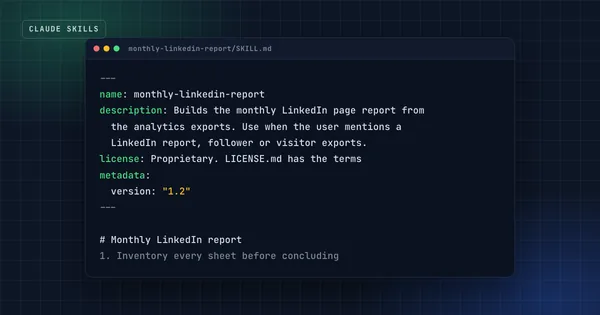
A monthly LinkedIn report I produced with Claude once skipped the visitor tabs in the analytics export. With those tabs included, the data pointed the opposite way. The fix was one rule: inventory every sheet before concluding. The catch with rules like that is where they live. Typed into one chat, they're gone in the next.
Claude Skills fix exactly that. A skill is a folder of instructions, and optionally scripts and templates, that Claude loads by itself when a task matches. You write the hard-won rule once, and it applies every time, in every chat, without you remembering to paste it.
At a glance
- A Claude skill (Anthropic's term is Agent Skill) is a folder with a
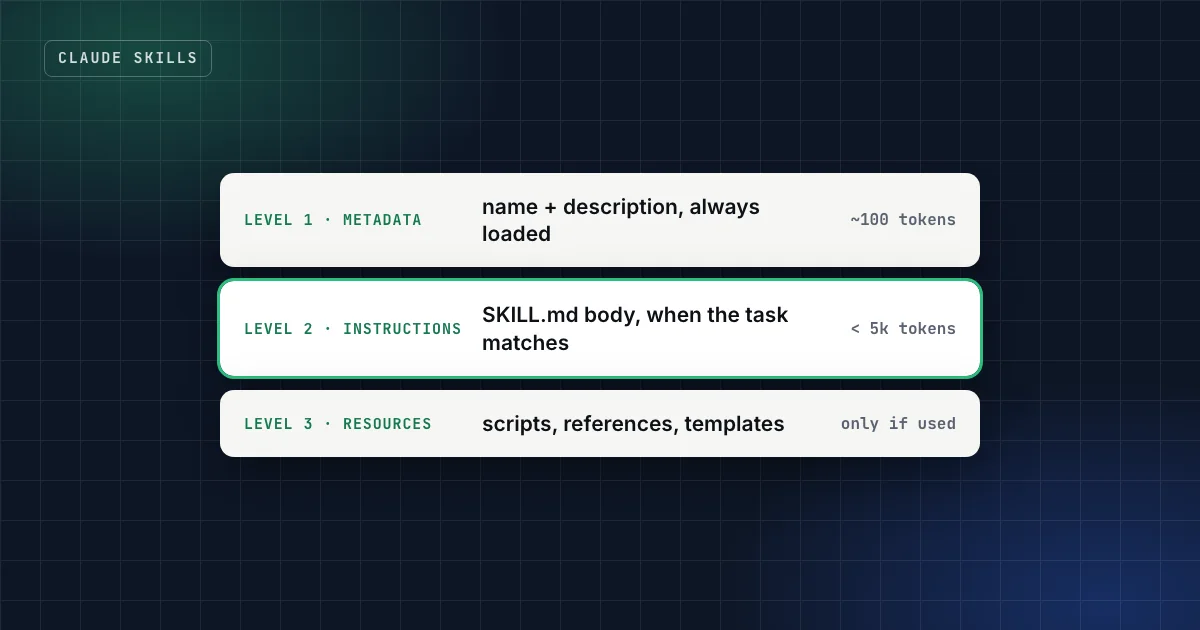
SKILL.mdfile: a name, a description, and instructions. Scripts, references and templates are optional. - Claude reads only the name and description up front, about 100 tokens per skill, and loads the rest when your request matches.1
- Skills work in Claude.ai, Claude Desktop, Claude Code and the Claude API, and the same format runs in Codex, ChatGPT, GitHub Copilot, Cursor and dozens of other agents.2
- A skill is only as good as what it knows that Claude doesn't. Format is easy; the checks that came from real failures are the value.
- Install skills like software: only from sources you trust, after reading the files.1
What is a Claude skill?
A Claude skill is a folder that teaches Claude one job. At minimum it contains a SKILL.md file. At the top of that file, a few lines of YAML front matter give the skill a name and a description. Below them, plain Markdown explains how to do the job: the steps, the checks, the output format, and the mistakes to avoid.
Anthropic introduced Agent Skills in October 2025 and compares building one to writing an onboarding guide for a new colleague.3 In December 2025 it published the format as an open standard at agentskills.io, which is why the same folder now works in tools from other companies too.3
A real skill from this site's catalog looks like this:
linkedin-analytics-report/
├── SKILL.md                  # the workflow and the checks
├── scripts/
│   ├── inventory_workbooks.py  # lists every sheet before analysis starts
│   └── parse_visitor_list.py   # proves the visitor count adds up
└── references/
    ├── pitfalls.md           # incidents that shaped the rules
    └── deck-style.md
The SKILL.md describes the workflow. The scripts do the parts that must be exact every time, like counting rows. The references hold detail that Claude only reads when it needs it.
How do Claude skills work?
Skills load in three stages, which Anthropic calls progressive disclosure.1 This is what lets you install many skills without filling Claude's context window with instructions it isn't using.
Two consequences matter in practice:
- The description is the trigger. Claude decides whether to use a skill by matching your request against its description. A vague description ("helps with documents") means the skill never switches on, or switches on at the wrong time.
- Scripts are cheap and reliable. When a skill runs a script, the code itself never enters the context window, only its output does.1 That makes scripts the right place for anything that must be exact: validation, counting, file conversion.
In Claude Code you can also call a skill directly by typing /skill-name, and custom slash commands have been merged into skills: a file in .claude/commands/deploy.md and a skill in .claude/skills/deploy/ both create /deploy.4
Practical takeaway
When a skill doesn't trigger, fix the description before anything else. Name the task, the inputs and the words people actually use ("monthly LinkedIn report", "visitor export", "competitor benchmark").
Where do Claude skills work?
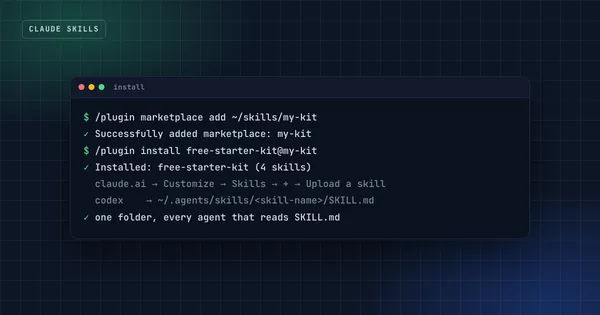
Skills run on every Claude surface, but each surface installs them differently, and custom skills don't sync between surfaces.1 A skill you upload to Claude.ai isn't available in Claude Code or the API until you add it there too.
| Where | How you add a skill | Good to know |
|---|---|---|
| Claude.ai and Claude Desktop | Customize → Skills → + → Upload a skill (a zip) | Needs "Code execution and file creation" turned on. Available on Free, Pro, Max, Team and Enterprise plans.5 |
| Claude Code | A folder in ~/.claude/skills/ (all projects) or .claude/skills/ (one project), or a plugin | Call one directly with /skill-name. Plugins add a namespace: /plugin:skill.4 |
| Claude API | Upload through the Skills API (/v1/skills) | Runs in the code execution container, with no network access and no package installs.1 |
| Codex and ChatGPT | ~/.agents/skills/ or .agents/skills/ in a repository | Mention one with $skill-name in Codex or @ in ChatGPT.6 |
| GitHub Copilot, Cursor and others | .agents/skills/, .github/skills/, .cursor/skills/, depending on the tool | The agentskills.io showcase listed more than 40 compatible tools in October 2026.2 |
Anthropic also ships four pre-built skills for documents: PowerPoint, Excel, Word and PDF. They work in Claude.ai and the API without setup, which is why Claude can hand you a real .xlsx file instead of a table in the chat.1
The full install steps, including what to check when a skill doesn't show up, are in how to install Claude skills.
How are skills different from prompts, projects and MCP?
People mix these up because they all "give Claude more context". They do different jobs:
| What it is | When it loads | Use it for | |
|---|---|---|---|
| Prompt | Text you type in one chat | Once | A one-off request |
| Project / CLAUDE.md | Standing instructions for a workspace or repo | Every conversation in it | Facts that always apply: conventions, commands, context |
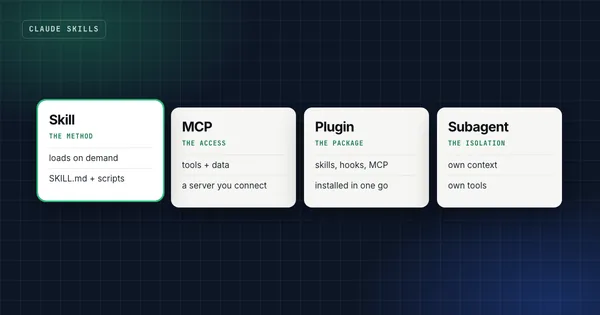
| Skill | A folder with a workflow, scripts and checks | Only when a task matches | Repeatable jobs you want done the same way every time |
| MCP server | A connection to an outside system | When Claude calls one of its tools | Live data and actions: your calendar, a database, an API |
A useful rule of thumb from Anthropic's Claude Code guide: keep the always-on file short, and move anything that only matters sometimes into a skill, because skills load on demand "without bloating every conversation".7 A skill can also use an MCP server: the server provides the access, the skill provides the method.
The detailed comparison, including plugins, subagents and hooks, is in Claude skills vs MCP vs plugins vs subagents.
What makes a skill worth installing?
Here's the uncomfortable part. Ask Claude to write a skill and you'll get a well-formatted SKILL.md within a minute. Anthropic's own guidance says Claude "understands the Skill format and structure natively".8 So the format is not the hard part.
The hard part is what Claude doesn't know yet. A skill generated from a prompt contains Claude's default approach, tidied up. That's the same thing it would have done without the skill, so nothing changes. Anthropic's authoring guide makes the same point from the other side: only add context Claude doesn't already have, and build evaluations from real failures before you write the instructions.8
Every skill in this site's catalog started with a failure that cost something:
- The sheet nobody read. A monthly report skipped the visitor tabs and reached the opposite conclusion. The skill now inventories every sheet with a script before any analysis.
- The improvement that wasn't. In an evaluation project, a parse rate jumped from 0.74 to 0.98 after a retry loop was added, but the first attempt was already at 0.98: the serving stack had drifted. The evaluation skill now logs first-attempt metrics, so drift can't pass as an improvement.
- The internal file a website kept serving. A private repository's site published its internal planning docs for months. The deploy skill now probes the live site for files that shouldn't be there.
You can't ask Claude for a check you don't know you need. That's the test for any skill, free or paid: does it contain something Claude wouldn't have done anyway?
Practical takeaway
Before you install a skill, open its SKILL.md and look for specific rules with reasons, scripts that verify something, and examples of failures. If it's only general advice ("be thorough", "check your work"), you don't need it.
Which Claude skills are worth trying first?
Start with jobs you repeat every week, because that's where a skill pays back fastest:
- Documents. Anthropic's built-in PowerPoint, Excel, Word and PDF skills are already active in Claude.ai.
- Coding sessions. A handover routine, so the next session (or the next agent) can continue cold. The Claude Code handover guide explains the template.
- Recurring reports. Monthly analytics, competitor benchmarks, status updates: anything with a fixed structure and known pitfalls.
- Content with rules. SEO articles with verification rules, social captions checked against current platform limits, posts in a specific person's voice.
- Learning. A tutor that makes you attempt an exercise before it explains, and keeps honest scores.
The free starter kit on this site has four of these: the coding handover, the session-start preflight, a caption writer and an exam-prep tutor. They're a quick way to see what a skill built from real work looks like.
Are Claude skills safe?
A skill is instructions plus code that runs on your machine or in Claude's sandbox, so treat it like any software you install. Anthropic's documentation is direct about it: use skills only from trusted sources, and audit anything else thoroughly before use, because a malicious skill can direct Claude to run code or move data in ways that don't match its stated purpose.1
The risk isn't theoretical. In February 2026, Snyk analysed 3,984 skills from public marketplaces and found 76 confirmed malicious payloads, and 13.4% of all skills had at least one critical security issue.9 Read the 10-minute skill audit before installing anything from a public directory.
FAQ
Are Claude skills free?
The skill format is free, and Anthropic's document skills are included in Claude.ai. Many community skills are free on GitHub; some are sold as packs. Using skills in Claude.ai requires code execution to be turned on, which is available on the Free, Pro, Max, Team and Enterprise plans.5
Do I need to code to use or write a skill?
No. Using a skill means uploading a zip or copying a folder. Writing one means writing Markdown. Scripts are optional, and only worth adding for steps that must be exact.
Can Claude write a skill for me?
Yes. Ask Claude to turn a workflow you just finished into a skill, and it will produce the folder. Review it for content Claude already knew and cut that; keep the specific rules, examples and checks that came from your work.
Do Claude skills work in ChatGPT and Codex?
The format does. OpenAI's documentation describes skills for both ChatGPT and Codex, stored in ~/.agents/skills or a repository's .agents/skills folder.6 Check a skill's requirements: a skill that relies on Claude-specific tools or settings may need small changes.
How many skills can I install?
There's no small fixed limit, because only each skill's name and description load up front. In Claude Code, the description shown in the skill listing is truncated at 1,536 characters, so put the key use case first.4
Sources
- Agent Skills overview, Claude Platform documentation, Anthropic.
- Agent Skills: overview and client showcase, agentskills.io.
- Equipping agents for the real world with Agent Skills, Anthropic Engineering, 16 October 2025 (updated 18 December 2025).
- Extend Claude with skills, Claude Code documentation.
- Use skills in Claude, Claude Help Center.
- Build skills, OpenAI documentation for ChatGPT and Codex.
- Best practices for Claude Code, Claude Code documentation.
- Skill authoring best practices, Claude Platform documentation.
- Exploring the threat landscape of agent skills, Snyk Labs, 5 February 2026.
Get the free starter kit
Four complete skills for Claude, Claude Code and Codex: handover, session start, social captions and an honest exam-prep tutor. Free, so you can judge the standard.