 AI Tool Consultant
Claude Code and Codex Workflow Skills
Run two coding agents on real products without losing the thread, or your secrets.
Six skills from building products with Claude Code and Codex side by side: a multi-agent repo setup, an overnight-run report format, honest acceptance checklists, guardrails for LLM features, a deploy exposure check with a probe script, and BUILD / DEBUG / PRACTICE modes for learning while shipping.
6 skills, each built from real work
Multi-Agent Repo Setup
One canonical guide (CLAUDE.md) with AGENTS.md as a pointer, a handover file as the only shared state, one agent per repo in parallel, fenced paths, and push and deploy rules.
- CLAUDE.md canonical, AGENTS.md a thin pointer
- One agent per repository for parallel work
- Treats a push as a deployment on preview platforms
Overnight Agent Report
Scopes an unattended run with a no-touch list, commits per step, never pushes without approval, and reports in seven fixed sections that separate built, verified and untested.
- Seven fixed sections, risks first
- Built, verified and tested are never blurred
- Written during the run, so a crash loses nothing
Manual Acceptance Checklist
Writes the checklist a human runs after an agent builds a feature: what wasn't verified, concrete actions with expected results, desktop and phone, themes, languages, negative tests and known caveats.
- States exactly what the agent did not check
- Desktop and phone, light and dark, every language
- Known caveats placed where the tester meets them
LLM Feature Guardrails
Audits AI features before launch: input checks before model calls, a no-meaningful-attempt path, rate limits, server-side keys, output contracts and leakage filters, provider data-use, access gates and launch basics.
- Inputs like 'test' and 'asdf' advanced a real product until this check existed
- A 'no meaningful attempt' path stops generous feedback
- Provider data-use and beta access-gate checks
Deploy Exposure Check
Requests every internal-looking repo file from the live site with a bundled probe script, detects soft 404s, fixes exposure at the host, and re-checks after deploy, including previews and client bundles.
- Built after a private repo's site served its internal plans publicly
- Probe script with soft-404 detection
- Fixes for Vercel, Netlify, GitHub Pages and S3
Build, Debug, Practice Modes
Three explicit modes for working with a coding agent: BUILD delivers, DEBUG fixes or teaches, PRACTICE lets you write the code with five escalating hint levels, plus a Code Red modifier that never skips tests.
- Five hint levels, no solution before a real attempt
- Code Red skips teaching, never tests
- A weekly learning rhythm that works
Two minutes to install.
Before you buy
When can I buy?
Soon: checkout isn't open yet. Follow on LinkedIn to hear when it opens.
Which tools do the skills work with?
Claude.ai and Claude Desktop (upload a zip), Claude Code (plugin or folder), Codex (folder), and other agents that read the open SKILL.md format. A few skills include Python scripts; each skill page lists exactly what it needs.
How do I install them?
In Claude Code, add the private marketplace you're invited to after purchase and install the pack with one command. For Claude.ai and Claude Desktop, turn on code execution in Settings → Capabilities, then upload one zip per skill under Customize → Skills. For Codex, copy the skill folders into ~/.agents/skills/. Then ask normally; a skill switches on when your request matches it.
Do I get updates?
Yes. In Claude Code, turn on auto-update for the marketplace (/plugin → Marketplaces), or update a pack with claude plugin update <pack>@aitoolconsultant. Zip buyers can download the latest version from their purchase page.
Can I use them for my team or my clients?
Yes, for your own work and for client work you do. You can share a pack inside one team of up to five people at one company. Please don't resell or publish the files.
Do you see my data?
No. Skills are instructions and scripts that run inside your own AI tool. Nothing is sent to us.
Comparisons for this workflow
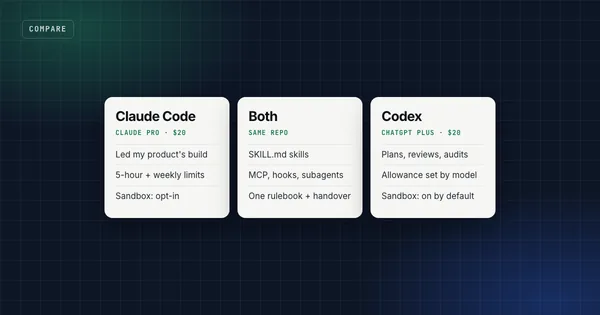
The skills work in Claude, Claude Code and Codex. If you're still picking the tool, start here.
Other workflows
LinkedIn Ghostwriting & Outreach
Write in a real person's voice, report what LinkedIn actually did, and run outbound that doesn't burn your domain.
SEO & Blog Content
Keyword research from evidence, one URL per keyword, and articles where every claim has a source.
Learn German with AI
The daily method behind months of measured German progress, as skills Claude can run for you.