AI Tool Consultant

Here's a trap the spec doesn't warn you about. A field like disable-model-invocation works fine in Claude Code, and the same skill then fails to upload to Claude.ai. Claude Code's documentation spells it out: outside Claude Code, only the standard fields are accepted, and any other field causes "a hard error instead of ignoring the field".1
That's the most expensive detail of the SKILL.md format, but not the only one. This is the complete reference: what's required, what's optional, what each tool adds on top, and how to check a skill before you share it.
At a glance
- A skill is a folder whose
SKILL.mdstarts with YAML front matter (name,description) followed by Markdown instructions.2 name: 1–64 characters, lowercase letters, digits and hyphens, matching the folder name. Claude adds two reserved words: "anthropic" and "claude".2 3description: up to 1,024 characters, saying what the skill does and when to use it. It's the trigger, so it's the line to get right.2- Optional standard fields:
license,compatibility,metadata,allowed-tools. Claude Code accepts many more, but Claude.ai and the API reject them.1 - Keep
SKILL.mdunder 500 lines and move detail intoreferences/,scripts/andassets/.2
The smallest valid SKILL.md
A skill needs one folder and one file. The front matter sits between two lines of three dashes:
---
name: release-notes
description: Writes release notes from merged pull requests. Use when the user asks for release notes, a changelog entry or "what shipped this week".
---

# Release notes

1. List the merged pull requests since the last tag.
2. Group them into Added, Changed and Fixed.
3. Write one plain sentence per change, for users, not developers.
That's a complete, valid skill. Everything else in this guide makes it more reliable, more portable or easier to find.
Which frontmatter fields does the SKILL.md standard define?
The open Agent Skills specification defines six fields. Two are required.2
| Field | Required | Rules |
|---|---|---|
name | Yes | 1–64 characters. Lowercase letters, numbers and hyphens. No hyphen at the start or end, no double hyphens. Must match the parent folder's name. |
description | Yes | 1–1,024 characters. What the skill does and when to use it, with the keywords people actually use. |
license | No | A license name, or a pointer to a bundled license file. |
compatibility | No | Up to 500 characters on environment needs: the intended product, system packages, network access. Most skills don't need it. |
metadata | No | A map of string keys to string values, for anything the spec doesn't define (author, version). |
allowed-tools | No | Experimental. A space-separated list of tools the skill may use without asking, for example Bash(git:*) Read. Support varies by agent. |
Claude adds two restrictions of its own: names and descriptions can't contain XML tags, and names can't contain the reserved words "anthropic" or "claude".3 So claude-helper is valid in the open spec and rejected by Claude.
How should you name a skill?
Valid examples: pdf-processing, release-notes, german-writing-correction. Invalid: PDF-Processing (uppercase), -pdf (leading hyphen), pdf--processing (double hyphen), and any name that doesn't match its folder.2
Anthropic's authoring guide suggests the gerund form (processing-pdfs, writing-documentation) and warns against vague names like helper, utils or tools.4 Noun phrases (release-notes) are fine too. What matters more is consistency across your own collection, so people can guess a name and find it.
How do you write the description?
The description is the only part of a skill that's always loaded, and it's what the agent matches your request against.3 Three rules from Anthropic's guide cover most problems:4
- Say what and when. "Extract text and tables from PDF files, fill forms, merge documents. Use when working with PDF files or when the user mentions PDFs, forms, or document extraction."
- Write in the third person. The description is injected into the system prompt, so "Processes Excel files" works and "I can help you with Excel" causes discovery problems.
- Use the words people use. If people say "changelog", put "changelog" in the description, even if you call it release notes.
Front-load the key use case, because tools shorten long descriptions. Claude Code truncates the combined description and when_to_use text at 1,536 characters in its skill listing.1 Codex gives the whole skill list a budget of about 2% of the model's context window and shortens descriptions first when it runs out.5
Practical takeaway
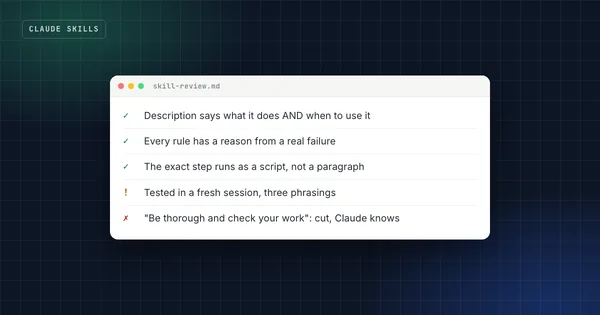
Test a description by asking for the task in three different ways, without naming the skill. If the skill doesn't switch on for all three, add the missing words to the description before you touch the instructions.
Which extra fields does Claude Code accept?
Claude Code extends the format with fields that control how and when a skill runs:1
| Field | What it does |
|---|---|
when_to_use | Extra trigger context, appended to the description in the listing |
argument-hint, arguments | Autocomplete hints and named arguments for /skill-name calls |
disable-model-invocation | true means only you can start the skill, by typing /skill-name |
user-invocable | false hides it from the / menu, so only Claude starts it |
allowed-tools, disallowed-tools | Pre-approve or remove tools while the skill is active |
model, effort | Override the model or effort level for that turn |
context: fork, agent | Run the skill in a forked subagent context |
hooks, paths, shell | Register hooks, limit automatic activation to file patterns, choose bash or PowerShell |
These are useful, and they're also the reason for the upload error at the top of this article. Outside Claude Code, in Claude.ai uploads and the Skills API, only name, description, license, compatibility, metadata and allowed-tools are accepted. Anything else is a hard error.1
If a skill should work everywhere, keep its front matter to those six fields. If you need Claude Code features, keep a Claude Code version of the skill separately, or document that the skill is Claude Code only in compatibility.
What does Codex add?
Codex reads the same SKILL.md and adds one optional file: agents/openai.yaml. It sets how the skill appears in the ChatGPT desktop app, declares tool dependencies such as MCP servers, and controls invocation. Setting allow_implicit_invocation: false stops Codex from choosing the skill on its own, while $skill-name still works.5 Claude ignores the file, so including it costs nothing.
How should the skill folder be structured?
Everything beyond SKILL.md is optional, and the spec recommends three folders:2
release-notes/
├── SKILL.md            # required: front matter + instructions
├── scripts/            # code the agent runs (Python, Bash, JavaScript)
├── references/         # detail the agent reads only when needed
└── assets/             # templates, images, data files
Size guidance from the spec and Anthropic's guide:2 4
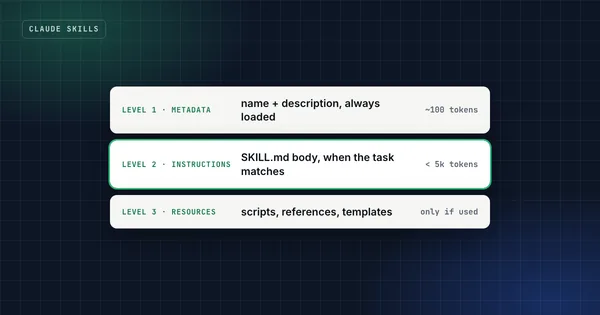
- The name and description are about 100 tokens and load for every installed skill.
- The full
SKILL.mdloads when the skill activates. Keep it under 5,000 tokens and under 500 lines. - Files in
references/,scripts/andassets/load only when used. Scripts are executed, so their code never enters the context, only their output. - Keep references one level deep: link every reference file directly from
SKILL.md. Claude may only preview files that are referenced from other references.4 - Use forward slashes in paths (
scripts/check.py), even on Windows.
A complete example
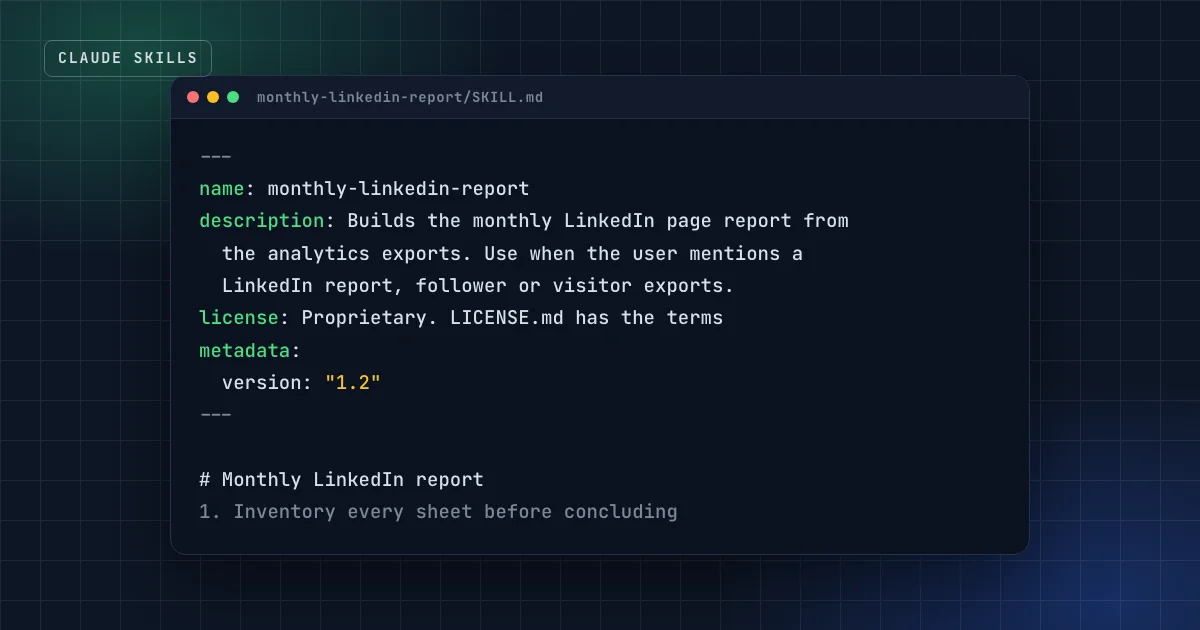
Here's a portable skill that uses only the standard fields, a script for the step that must be exact, and a reference file for the detail:
---
name: monthly-linkedin-report
description: Builds the monthly LinkedIn company-page report from the analytics exports (followers, visitors, content). Use when the user asks for a LinkedIn report, a monthly social media review, or shares LinkedIn export files.
license: Proprietary. LICENSE.md has the terms
metadata:
  author: example-studio
  version: "1.2"
---

# Monthly LinkedIn report

## Before any analysis
1. Run `python scripts/inventory_workbooks.py <folder>` and read its output.
   Every sheet in every file must be listed before you conclude anything.
2. If the visitor export is missing, stop and ask for it. Followers alone
   can point the wrong way.

## Analysis
- Compare followers AND visitors month over month.
- Forecasts: give two scenarios (recent pace, campaign pace), never one number.

## Output
Follow the slide order in [references/deck-style.md](references/deck-style.md).
How do you validate a skill?
Three checks catch nearly every format problem before anyone else sees it:
- The reference validator. The spec's
skills-reflibrary checks the front matter and naming rules:skills-ref validate ./my-skill.2 - Claude Code's plugin validator, if you ship skills as a plugin:
claude plugin validate ./my-pluginchecks the manifest and each skill.6 - A real upload. If the skill is meant for Claude.ai, upload the zip once. That's the only place the "unknown field" error shows up.
FAQ
Is the front matter YAML?
Yes, a small subset of it: key-value pairs between two --- lines at the very top of the file. Quote values that contain colons or start with special characters, and keep metadata values as strings.
Can a skill have more than one Markdown file?
Yes. Only SKILL.md is required. Put other files in references/ and link them from SKILL.md, one level deep, so the agent reads them when needed.
What happens to fields a tool doesn't recognize?
It depends on the tool. Claude Code ignores unrecognized fields without an error.1 Claude.ai and the Skills API reject anything outside the six standard fields.1 That asymmetry is why portable skills stick to the standard.
Does the order of the frontmatter fields matter?
No. Put name and description first anyway, because that's where people look.
Sources
- Extend Claude with skills, Claude Code documentation.
- Agent Skills specification, agentskills.io.
- Agent Skills overview, Claude Platform documentation.
- Skill authoring best practices, Claude Platform documentation.
- Build skills, OpenAI documentation for ChatGPT and Codex.
- Create a marketplace, Claude Code documentation.
Get the free starter kit
Four complete skills for Claude, Claude Code and Codex: handover, session start, social captions and an honest exam-prep tutor. Free, so you can judge the standard.