 AI Tool Consultant
LinkedIn Ghostwriting Skills for Claude
Write in a real person's voice, report what LinkedIn actually did, and run outbound that doesn't burn your domain.
Five skills from running LinkedIn and outbound for a B2B start-up: founder ghostwriting with distinct voices and no AI tells, a monthly analytics report that checks every tab, branded carousels rendered to PDF, cold outreach sequences with German B2B rules, and a Lemlist audit ordered by damage.
5 skills, each built from real work
LinkedIn Ghostwriter
Builds a voice profile from past posts, asks whether a post is promotional, educational or personal, keeps several voices at one company distinct, and flags missing facts instead of inventing them.
- Distinct voices for founders and executives at one company
- Bans the constructions that make posts read as AI-written
- [FACT TO VERIFY] instead of plausible guesses
LinkedIn Analytics Report
Turns LinkedIn page exports into a monthly deck: reach, followers, content performance, audience quality for followers and visitors, competitor benchmark and event forecasts, ending in recommendations tied to findings.
- A run that skipped the visitors' tabs reached the opposite conclusion, so every tab is inventoried
- Two forecast scenarios, never one number (28 against 51 in one real case)
- Parse-count check for visitor lists
LinkedIn Carousel Maker
Writes the slides as a small JSON spec, builds self-contained HTML at 1080×1350 or 1080×1080, renders a PDF for LinkedIn document posts plus PNGs with headless Chrome, and checks every page.
- PDF and per-slide PNGs at LinkedIn's recommended size
- Brand theme in one JSON file
- Locked client-logo rules for testimonial cards
Cold Outreach Sequence Writer
Pain-first opening messages, soft calls to action, a natural break-up, one merge variable, a LinkedIn and email hybrid with a condition fork, enrichment hygiene, safe defaults and strict claims discipline, in English or German.
- First touch has one goal: a reply
- German B2B rules: du or Sie, English-first translation, AI-phrase blacklist
- Safe default settings and the 3% bounce ceiling
Lemlist Campaign Audit
Audits Lemlist (and similar sequencers) in order of damage: campaigns that send nothing, campaigns that hurt your domain, wasted leads and broken measurement, with a findings table and per-campaign checklist.
- Built from an audit of 22 live campaigns
- Found senders with no mailbox, leads with blank emails, and 122 stuck manual tasks
- Lists findings that were wrongly dismissed, and why
Two minutes to install.
Before you buy
When can I buy?
Soon: checkout isn't open yet. Follow on LinkedIn to hear when it opens.
Which tools do the skills work with?
Claude.ai and Claude Desktop (upload a zip), Claude Code (plugin or folder), Codex (folder), and other agents that read the open SKILL.md format. A few skills include Python scripts; each skill page lists exactly what it needs.
How do I install them?
In Claude Code, add the private marketplace you're invited to after purchase and install the pack with one command. For Claude.ai and Claude Desktop, turn on code execution in Settings → Capabilities, then upload one zip per skill under Customize → Skills. For Codex, copy the skill folders into ~/.agents/skills/. Then ask normally; a skill switches on when your request matches it.
Do I get updates?
Yes. In Claude Code, turn on auto-update for the marketplace (/plugin → Marketplaces), or update a pack with claude plugin update <pack>@aitoolconsultant. Zip buyers can download the latest version from their purchase page.
Can I use them for my team or my clients?
Yes, for your own work and for client work you do. You can share a pack inside one team of up to five people at one company. Please don't resell or publish the files.
Do you see my data?
No. Skills are instructions and scripts that run inside your own AI tool. Nothing is sent to us.
Comparisons for this workflow
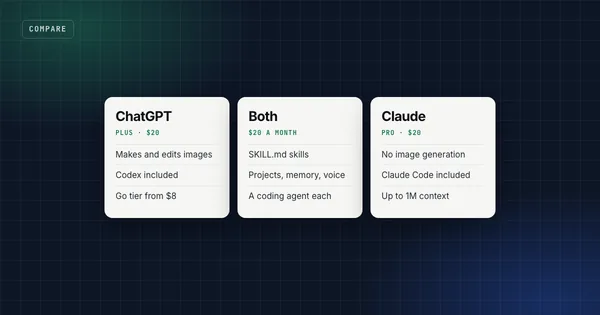
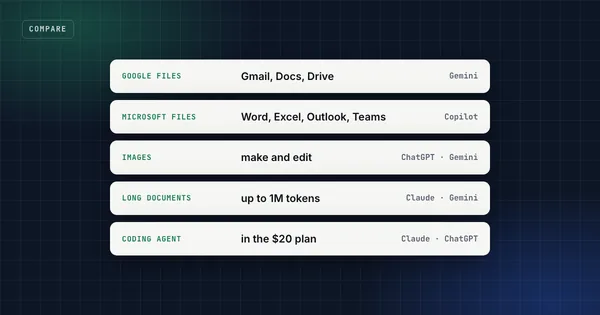
The skills work in Claude, Claude Code and Codex. If you're still picking the tool, start here.
Other workflows
SEO & Blog Content
Keyword research from evidence, one URL per keyword, and articles where every claim has a source.
Learn German with AI
The daily method behind months of measured German progress, as skills Claude can run for you.
LLM Evaluation & Fact-Checking
Report AI results you never have to retract.