AI Tool Consultant

A skill is just a folder with a SKILL.md file in it, which makes it portable. It doesn't make installing it obvious, because every tool looks for skills in a different place. Claude.ai wants a zip uploaded through a menu, Claude Code reads folders from disk, Codex uses ~/.agents/skills, and the API wants an upload through its own endpoint.
This guide shows how to install Claude skills on every surface, step by step, with the paths and menu names from each tool's current documentation. If your skill is already installed but doesn't appear, skip to the troubleshooting table.
At a glance
- Claude.ai and Desktop: turn on "Code execution and file creation", then Customize → Skills → + → Create skill → Upload a skill.1
- Claude Code: a folder in
~/.claude/skills/(all projects) or.claude/skills/(one project), or a plugin from a marketplace.2 - Codex and ChatGPT:
~/.agents/skills/or.agents/skills/in a repository.3 Cursor and GitHub Copilot also read.agents/skills/.4 5 - Custom skills don't sync between surfaces. Install them separately in each tool you use.6
- Read a skill's files before you install it. Skills can run code.
Before you install: read the files
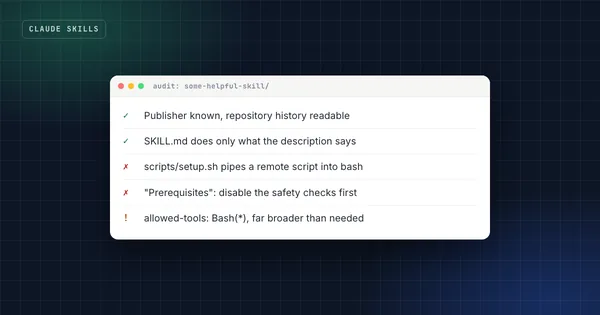
A skill is instructions plus, often, scripts that run on your machine. Anthropic's guidance is to use skills only from sources you trust, and to audit anything else before use.6 Open SKILL.md, skim the scripts, and look for network calls, downloads or instructions that don't match what the skill says it does. The full checklist is in the 10-minute skill audit.
How to install a skill in Claude.ai and Claude Desktop
Claude.ai and the Claude Desktop app share the same skills settings. The steps from Anthropic's Help Center:1
- Go to Settings → Capabilities and turn on "Code execution and file creation". Skills need it.
- Go to Customize → Skills.
- Click +, then + Create skill, then Upload a skill.
- Upload the zip. The skill appears in your list with a toggle, and Claude uses it when a request matches.
The zip should contain the skill folder, with SKILL.md inside it, and the folder's name should match the skill's name. Skills are available on the Free, Pro, Max, Team and Enterprise plans. On Team plans skills are enabled by default; on Enterprise, an owner turns them on under Organization settings → Plugins & skills.1
Team and Enterprise owners can also provision skills for everyone, and users can share a skill with specific people or publish it to the organization, depending on the organization's settings.1
Claude.ai only accepts the standard fields
If a skill uses Claude Code-only front matter such as disable-model-invocation, the upload fails. Outside Claude Code, only name, description, license, compatibility, metadata and allowed-tools are accepted.2
How to install a skill in Claude Code
Claude Code reads skills from folders. Where you put the folder decides who gets it:2
| Location | Path | Applies to |
|---|---|---|
| Personal | ~/.claude/skills/<skill-name>/SKILL.md | All your projects on this machine |
| Project | .claude/skills/<skill-name>/SKILL.md | This repository. Commit it and your team gets it too |
| Plugin | <plugin>/skills/<skill-name>/SKILL.md | Wherever the plugin is enabled, as /plugin-name:skill-name |
| Enterprise | The managed settings directory | Everyone on machines your organization manages |
When two skills share a name, enterprise wins over personal, and personal over project. Plugin skills are namespaced, so they can't collide with local ones.2
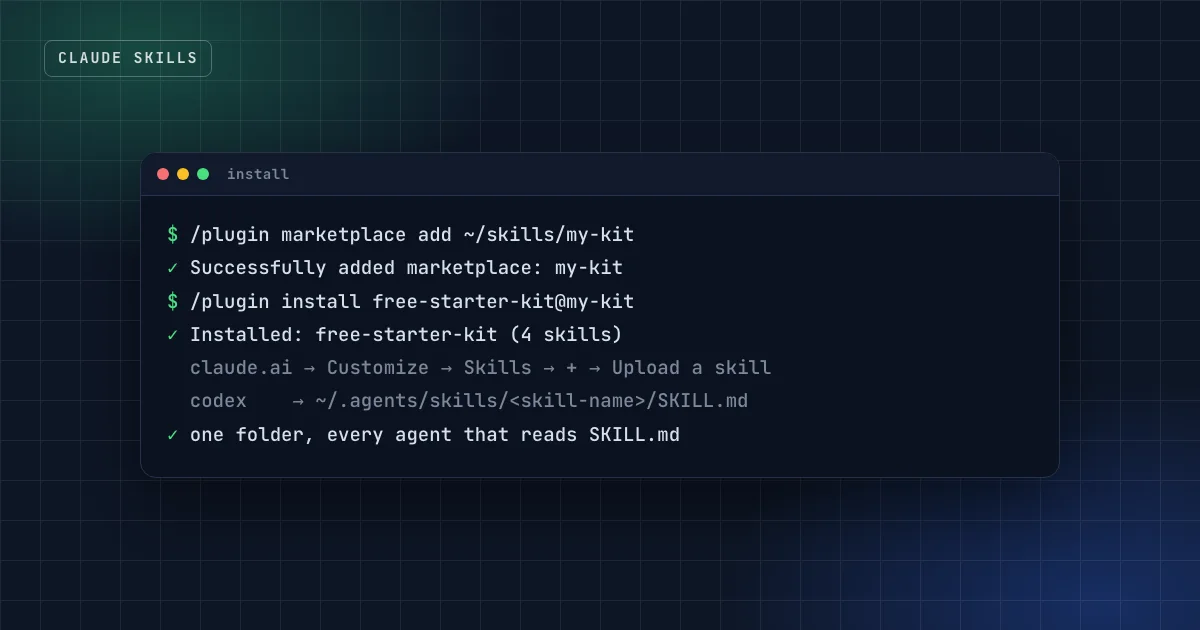
To install a plugin from a marketplace, register the marketplace once and install by name:7
/plugin marketplace add owner/repo
/plugin install plugin-name@marketplace-name
A marketplace can also be a folder on your disk: /plugin marketplace add ./path/to/folder works the same way, which is how the free starter kit on this site installs.
Once installed, Claude uses a skill when your request matches its description, or you call it directly with /skill-name. Edits to an existing skill apply without a restart; a skills folder you create while Claude Code is running needs /reload-skills.2
How to add a skill through the Claude API
On the API, you upload custom skills through the Skills API (/v1/skills) and reference them by ID in the container parameter, together with the code execution tool. Uploaded skills are shared across your workspace.6
Two limits shape what a skill can do there: API skills run in a sandbox with no network access and no runtime package installation, only pre-installed packages.6 A skill that downloads data or installs a library won't work on the API without changes.
How to install a skill in Codex and ChatGPT
OpenAI's documentation describes skills for both ChatGPT and Codex.3 Codex reads skills from:
.agents/skillsin your current folder, and in each parent folder up to the repository root$HOME/.agents/skillsfor skills that apply everywhere/etc/codex/skillsfor admin-installed skills
In the Codex CLI or IDE extension, run /skills or type $ to mention a skill; Codex can also pick one on its own when your task matches. The built-in $skill-installer and $skill-creator skills help you add and write skills. In ChatGPT, type @ to select a skill.3
An optional agents/openai.yaml file inside a skill controls how it appears in the ChatGPT desktop app and whether Codex may start it without being asked.3
How to install a skill in Cursor
Cursor reads skills from .agents/skills/ and .cursor/skills/ in a project, and from ~/.agents/skills/ and ~/.cursor/skills/ for all projects. For compatibility it also reads .claude/skills/ and .codex/skills/, so a skill you already use in Claude Code usually just works.4
Type / in Agent chat to call a skill by name. One limit to know about: only ~/.cursor/skills/ syncs to Cloud Agents, and only if Sync Skills is turned on.4
How to install a skill in GitHub Copilot
GitHub Copilot reads project skills from .github/skills, .claude/skills or .agents/skills, and personal skills from ~/.copilot/skills or ~/.agents/skills.5 Skills work across the Copilot cloud agent, Copilot code review, the Copilot CLI and agent mode in VS Code and JetBrains IDEs.5
Can one folder serve every agent?
Almost. .agents/skills (in a repository) and ~/.agents/skills (personal) are read by Codex, Cursor and GitHub Copilot. Claude Code reads .claude/skills, which Cursor and Copilot also accept. So a repository with skills in .claude/skills/ covers Claude Code, Cursor and Copilot, and a copy in .agents/skills/ adds Codex.
If you manage many skills across many agents, the open-source skills command-line tool from Vercel installs skill repositories into multiple agents' folders with one command, for example npx skills add owner/repo.8
Why isn't my skill showing up?
Most "skill not working" problems fall into a few patterns. Find the symptom, then check the cause:
| Symptom | Likely cause | Fix |
|---|---|---|
| Claude.ai upload fails | The zip is too large, SKILL.md is missing, the folder name doesn't match the skill name, or the name or description has invalid characters1 | Rebuild the zip with one folder named exactly like the skill |
| Upload fails with a front-matter error | A Claude Code-only field such as context or disable-model-invocation2 | Keep only the six standard fields for Claude.ai |
| Uploaded, but never used | The skill is toggled off, code execution is off, or the description doesn't match how you ask | Check the toggle and Settings → Capabilities, then rewrite the description with your own words for the task |
| Claude Code doesn't see a new skill | Wrong folder, a folder name that differs from name, or a skills folder created after startup | Check the path, then run /reload-skills2 |
| The wrong skill runs | Two skills with overlapping descriptions, or a same-named skill with higher precedence | Make descriptions distinct; rename one of the skills |
| Codex ignores some skills | Too many skills for the listing budget, so descriptions get shortened or dropped | Remove unused skills or raise skills.max_context_tokens3 |
| A skill works locally but not on the API | It needs the network or a package that isn't installed6 | Bundle what it needs, or keep that skill for local tools |
Practical takeaway
When a skill doesn't trigger, test by asking for the task three ways without naming the skill. If it fails all three, the description is the problem, not the instructions.
FAQ
Do Claude skills work on the free plan?
Yes. According to Anthropic's Help Center, skills are available on the Free, Pro, Max, Team and Enterprise plans, with "Code execution and file creation" turned on.1
Do I install a skill once for all my Claude apps?
No. Custom skills don't sync between surfaces: a skill uploaded to Claude.ai isn't available in Claude Code or the API, and the other way round.6 Claude.ai and Claude Desktop share one list.
How do I update an installed skill?
In Claude Code, edit the folder; changes apply without a restart. For a plugin, open /plugin, find it on the Installed tab and choose Update now, or run claude plugin update <plugin>@<marketplace> in your shell. Turning on auto-update for the marketplace makes this automatic; it's off by default for third-party marketplaces.7 In Claude.ai, upload the new version.
How do I remove a skill?
Delete the folder in Claude Code, Codex, Cursor or Copilot. In Claude.ai, open the skill, turn it off, then use the "…" menu next to the toggle and choose Delete.1
Sources
- Use skills in Claude, Claude Help Center.
- Extend Claude with skills, Claude Code documentation.
- Build skills, OpenAI documentation for ChatGPT and Codex.
- Agent Skills, Cursor documentation.
- About agent skills, GitHub Docs.
- Agent Skills overview, Claude Platform documentation.
- Install and manage plugins, Claude Code documentation.
- Agent Skills, Vercel documentation.
Get the free starter kit
Four complete skills for Claude, Claude Code and Codex: handover, session start, social captions and an honest exam-prep tutor. Free, so you can judge the standard.