AI Tool Consultant

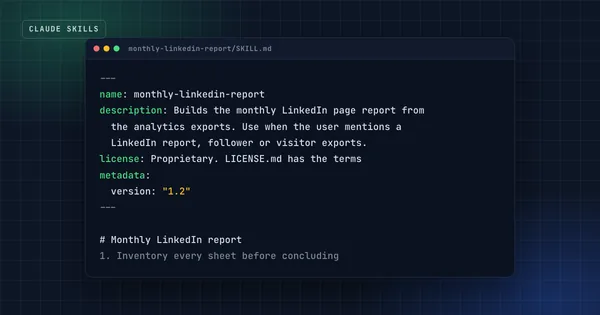
You can ask Claude to write a skill and get a perfectly formatted SKILL.md within a minute. Anthropic says as much in its authoring guide: Claude understands the skill format natively, and you don't need a special prompt to get one.1 So formatting a skill isn't the hard part.
The hard part is knowing what to put in it. A skill generated from a topic contains Claude's default approach to that topic, tidied up. That's what Claude would have done anyway, so installing it changes nothing. A skill only earns its place when it contains something Claude wouldn't do by itself: a check, a sequence, a format, a rule that came from a failure.
This is the method behind the 27 skills on this site, and it matches the evaluation-first approach Anthropic recommends.
At a glance
- Start from a failure, not a topic. Run the task without a skill, write down what went wrong, and build the skill to fix exactly that.
- Write the description first: what the skill does and when to use it, in the words people actually use, in the third person.1
- Write only what Claude doesn't already know. Anthropic calls the context window "a public good".1
- Put anything that must be exact into a script, and give every rule its reason.
- Test in a fresh session, phrased three different ways, before you trust it.
Step 1: start from a failure, not a topic
Anthropic's guidance is unusually direct here: "Create evaluations BEFORE writing extensive documentation."1 Its recommended loop is to run Claude on representative tasks without a skill, document the specific failures, build three test scenarios around them, measure the baseline, and only then write the minimal instructions that fix them.1
In practice, the failures that make good skills look like this:
- A step that gets skipped. A monthly report analysed follower data and skipped the visitor tabs, which reversed the conclusion.
- A number that can't be trusted. An evaluation reported an improvement that was really the model server changing between runs.
- An output that looks right and isn't. An article cited sources that loaded fine but didn't say what the article claimed.
- A document that says too much. A planning file described what the app should do, and later sessions assumed those features existed.
Each of those became a rule in a skill. None of them would have appeared in a skill written from the topic alone, because nobody asks for a check they don't know they need.
Practical takeaway
Keep a short failure log for any task you repeat: date, what went wrong, how you noticed. Three entries are enough to start a skill that's worth more than a prompt.
Step 2: write the description before anything else
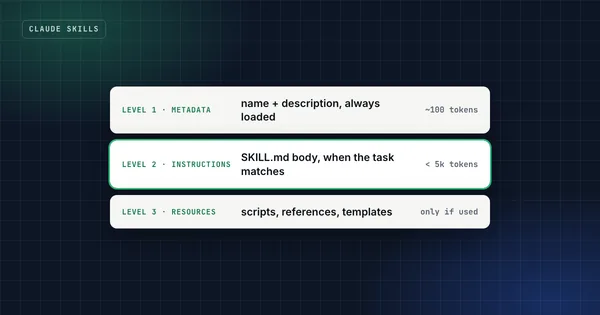
The description is the only part of a skill that's always loaded, and it decides whether the skill runs at all.2 Anthropic's guide gives three rules:1
- Say what it does and when to use it. "Generate descriptive commit messages by analyzing git diffs. Use when the user asks for help writing commit messages or reviewing staged changes."
- Write in the third person. The description goes into the system prompt; "I can help you…" causes discovery problems.
- Be specific. Claude may be choosing between more than 100 skills. "Helps with documents" will lose to anything more precise.
Add the words people actually type. If your team says "the weekly numbers" instead of "KPI report", put "weekly numbers" in the description. Front-load the main use case, because tools shorten long descriptions: Claude Code truncates the listing text at 1,536 characters.3
Step 3: write only what Claude doesn't already know
Anthropic's default assumption is worth quoting: "Claude is already very smart. Only add context Claude doesn't already have."1 For each paragraph, ask whether Claude really needs it. Explaining what a PDF is, or that tests are good, costs tokens and buries the rules that matter.
A useful test: delete a line and ask whether the output would change. If not, the line was decoration. Keep SKILL.md under 500 lines and move long reference material into separate files that load only when needed.1 4
| Keep | Cut |
|---|---|
| The order of steps when order matters | General advice ("be thorough", "double-check") |
| Rules with their reasons | Explanations of concepts Claude knows |
| Exact output formats and templates | Background history of the project |
| Thresholds and limits you've tested | Several alternatives where one default would do |
| Known failure cases and how to spot them | Time-sensitive notes that will go stale |
Step 4: choose how much freedom to give
Not every step needs the same precision. Anthropic frames it as degrees of freedom: high freedom (text guidance) when many approaches are valid, medium (a template or pseudocode) when a pattern is preferred, and low (an exact script, no variations) when an operation is fragile.1 Their analogy is a robot on a path: a narrow bridge with cliffs on both sides needs exact guardrails; an open field just needs a direction.
| Freedom | Use it for | Example |
|---|---|---|
| High | Judgment calls | "Review the draft for claims a reader would doubt" |
| Medium | A preferred structure | A report template with sections you can adapt |
| Low | Fragile, exact operations | "Run python scripts/validate.py out.json. Don't change the flags." |
Step 5: move exact steps into scripts
If a step must come out the same every time (counting, validating a schema, checking that a file was included), write a script. Scripts are more reliable than generated code, and when Claude runs one, the code itself never enters the context window; only its output does.2 Anthropic's guide calls this "solve, don't punt": handle errors in the script instead of leaving them for Claude to work out, and make error messages specific enough to act on.1
For multi-step operations with real consequences, Anthropic recommends a plan-validate-execute pattern: Claude writes a plan file, a script validates it, and only then does anything change.1 It's the difference between "update 50 fields" and "update 50 fields after a script confirmed every field exists".
Step 6: give every rule its reason
A bare rule ("always read every sheet") gets followed until it's inconvenient. A rule with a reason gets followed, and gets applied sensibly to cases you didn't foresee. The skills in this catalog give their rules a reason, often in this shape:
**Inventory every sheet before concluding.**
*Why:* a run that skipped the visitor tabs reached the opposite conclusion.
*How to check:* run `scripts/inventory_workbooks.py` and list every sheet in the report.
Rule, reason, check. The reason tells Claude what the rule protects. The check makes it verifiable instead of a matter of trust.
Step 7: test in a fresh session, three ways
Anthropic suggests working with two instances: "Claude A" helps you write and refine the skill, and "Claude B", a fresh session with the skill installed, uses it on real tasks while you watch what it does.1 Three things to test:
- Triggering. Ask for the task three different ways without naming the skill. It should switch on every time.
- Behavior. Run your three failure scenarios. The skill should fix what the baseline got wrong, without new problems.
- Models. If people will use the skill with a smaller model, test with one. Anthropic notes that what works for Opus may need more detail for Haiku.1
Watch how Claude moves through the skill, too. If it never opens a reference file, that file may be unnecessary; if it reads one in every run, that content probably belongs in SKILL.md.1
A checklist before you share a skill
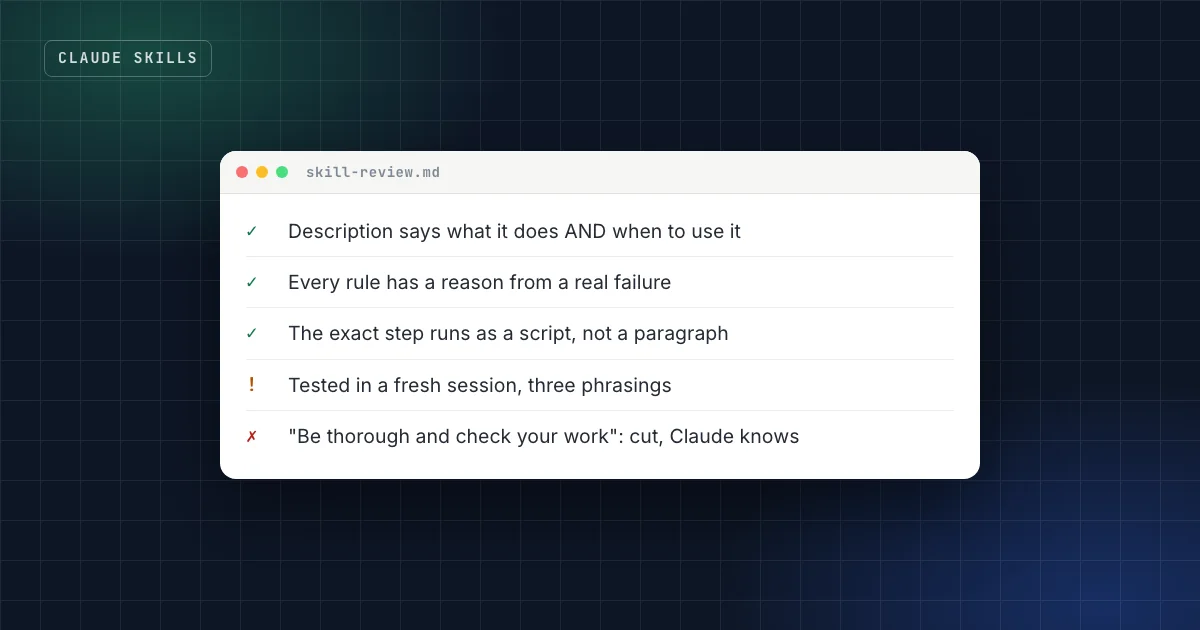
From Anthropic's guide, plus what this catalog adds:1
- The description says what the skill does and when to use it, with real trigger words.
SKILL.mdis under 500 lines; detail lives in reference files linked directly from it.- No time-sensitive information in the main instructions, and one term per concept throughout.
- Scripts handle their own errors, list their dependencies, and use forward slashes in paths.
- At least three test scenarios, run in a fresh session.
- Front matter uses only the standard fields if the skill should work in Claude.ai.3
- No internal information: names, customers, internal file paths, keys. Check this with a script, not by eye.
When shouldn't you write a skill?
- For a one-off task. A good prompt is enough.
- For facts that are always true about a project. They belong in
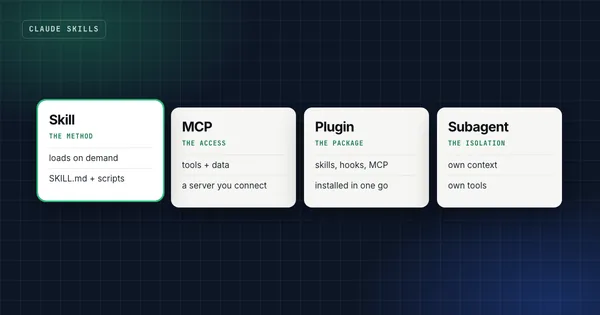
CLAUDE.mdor project instructions, which load every session.5 - When the missing piece is access, not method. If Claude can't reach your data, you need an MCP server or a connector first.
- When Claude already does it well. Measure the baseline. If it passes your scenarios without a skill, you're done.
FAQ
Can I just ask Claude to write the skill?
Yes, and you should, once you know what goes in it. Do the task with Claude first, note what you had to correct, then ask Claude to turn that session into a skill. Review the result and cut anything Claude would have known anyway.1
How long should a skill be?
As short as it can be while fixing the failures you found. Anthropic's guidance is under 500 lines for SKILL.md, with longer material in reference files.1
Do I need to add scripts?
Only for steps that must be exact or repeatable: validation, counting, file conversion. Instructions handle judgment better than scripts, and scripts handle precision better than instructions.
How do I know if my skill actually helps?
Run the same scenarios with and without it and compare. Anthropic recommends at least three evaluations per skill; there's no built-in runner, so a simple table of scenario, expected behavior and result is enough.1
Sources
- Skill authoring best practices, Claude Platform documentation.
- Agent Skills overview, Claude Platform documentation.
- Extend Claude with skills, Claude Code documentation.
- Agent Skills specification, agentskills.io.
- How Claude remembers your project, Claude Code documentation.
LLM Evaluation & Fact-Checking
Report AI results you never have to retract.
Get the free starter kit
Four complete skills for Claude, Claude Code and Codex: handover, session start, social captions and an honest exam-prep tutor. Free, so you can judge the standard.