AI Tool Consultant

Opening a German practice app to testers changed three things at once. Every check now cost a fraction of a cent, so a leaked access code could spend a month's budget in a day. Many people could use it at the same moment, so provider limits started to matter. And counting returning testers suddenly needed their consent. None of this exists on a laptop, and all of it needs to be in place before the link goes out.
This is the checklist that came out of it: LLM rate limiting and budgets at three levels, counting that works on serverless hosting, what happens when a provider says 429, how to measure usage without tracking people, and a launch you can undo. The numbers are from the real setup.
At a glance
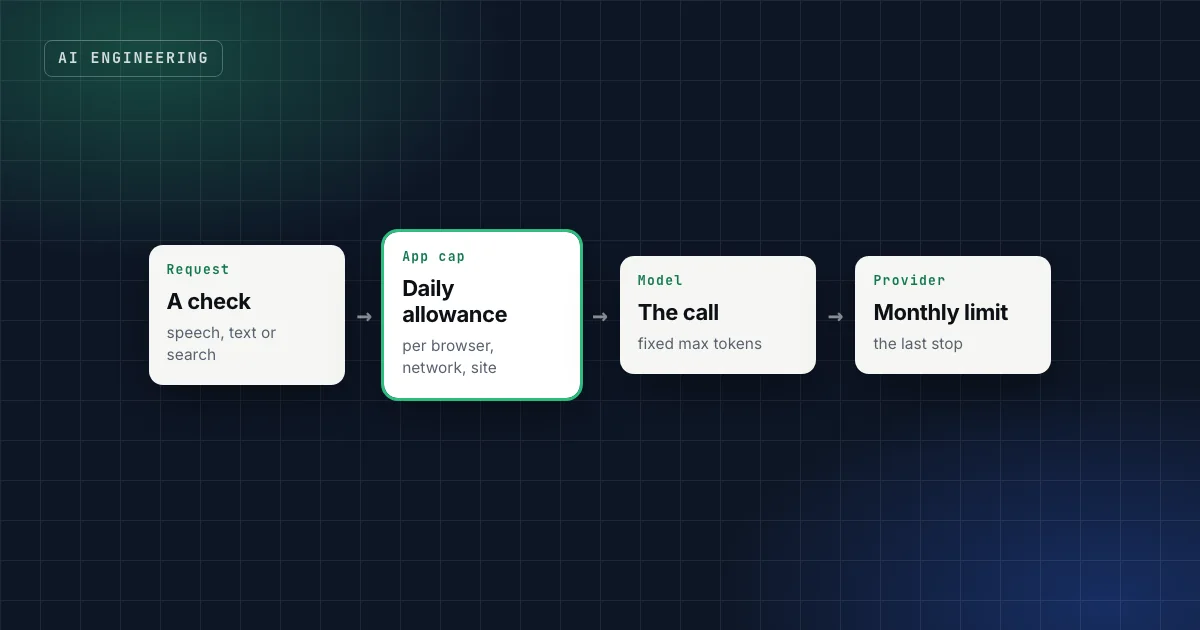
- Budget at three levels: the provider's monthly spend limit (the last stop), a daily cap in your app (per browser, per network, site-wide), and sensible per-request defaults such as maximum output tokens.
- Count in a database, not in memory. Serverless functions run as many short-lived instances; an in-memory counter resets and disagrees between them.
- Know your numbers. Measured here: about 1,640 input and 470 output tokens per check, around $0.0004 a check with Claude Haiku.
- Handle 429s: wait for
retry-afterwhen it's given, retry a bounded number of times, and tell the user plainly when you can't. - Ask for consent before counting returning visitors, and keep strictly necessary counting separate from analytics.
Budget at three levels
A hosted model bills per request, so a public feature needs more than one wall:
- The provider's monthly spend limit. Anthropic's API has a monthly spend cap per usage tier, and you can set your own lower limit in the Console.1 It's the last stop: when it's reached, requests fail until the month ends or you raise it.
- A daily cap in your app. Counters per browser, per network address and for the whole site. When one is full, the app answers "come back tomorrow" (HTTP 429) instead of calling the model. This is what stops one person, or one leaked code, from using up the month in a day.
- Per-request defaults. A maximum input length and a maximum number of output tokens per call. They keep a single strange request from being expensive.
In the practice app, the caps were 20 checks per browser and 300 for the whole site per day, with a network address allowed three browsers' worth. The provider's monthly limit sat behind all of it.
Practical takeaway
Set the provider's spend limit first, today, even before you build anything else. It's two minutes in the provider's console and it turns a potential disaster into an outage.
Count in a database, not in memory
On platforms like Vercel, your code runs in many short-lived instances. A counter in memory starts at zero in each one and disagrees with the others. So the counting lives in the database, as one SQL function that checks and increments in a single step, so every instance agrees.
Then decide what happens if the counter itself fails. The app fails open: if the counting database is down, requests go ahead, because a database hiccup shouldn't lock out every learner, and the provider's monthly limit is still the real wall behind it. For a feature where cost or abuse risk is higher, failing closed is the safer choice. Either way, make it a decision, not an accident.
Identify browsers and networks without tracking people
A daily cap needs to recognise a returning browser and a busy network. Two techniques do that with little personal data:
- A random browser ID in a cookie: not a name, not an account, just a random value.
- A hashed network address: a hash of the IP address plus the date plus a secret. It's countable today, unreadable, and different tomorrow.
Why both? Clearing cookies resets the browser ID, and the network address catches that. But a university or an office shares one address, so the address gets three browsers' worth of allowance instead of one.
Consent: what you may count without asking
In Germany, reading or storing information on a user's device needs consent unless it's strictly necessary for the service the user asked for (§ 25 TDDDG, the German law that implements the EU's ePrivacy rules).2 That splits counting into two kinds:
| Counting | Needs consent? | Why |
|---|---|---|
| The daily cap's browser ID | Treated as strictly necessary | The cap can't work without it, and it protects the service the user is using |
| "This tester came back three times" | Yes | Useful for you, not needed for the user's request |
So the app counts events (like "an answer was checked") for everyone, but only attaches the browser ID to an event when the cookie banner's analytics option was allowed. Insights then show checks from everyone and returning testers only among those who consented. Get this reviewed for your own case; the split is the point, not the exact wording.
What happens when many people arrive at once?
This was the question before inviting 80 testers. Three things can run out, each with its own limit:
| Service | Limit that applied | 80 people in the same minute |
|---|---|---|
| Claude API (Anthropic), Start tier | Measured in requests, input tokens and output tokens per minute, per model1 | About 131,000 input and 37,000 output tokens: well inside the limit |
| Hosted speech-to-text (Groq) | 20 requests a minute on the plan in use3 | From the 21st recording that minute, a 429 |
| The app's own daily cap | 300 checks for the whole site | 80 testers × 4 answers = 320: the site counter fills |
Three details from the documentation matter here. Anthropic notes that a per-minute limit "might be enforced" over shorter intervals, so a burst can fail even when the minute's total is fine.1 New organisations may start in an Evaluation tier with lower limits until they build usage history.1 And Groq's 429 responses include a retry-after header that says how many seconds to wait.3
So the app waits and retries (twice) when the provider says how long to wait, and otherwise shows a plain message. The weakest link wasn't the language model at all; it was the speech-to-text plan. Fine for people trying the app at home over a day, not for a classroom where everyone presses "record" at once.
Know your numbers before you open
Measure one real call before you set any limit. With Claude Haiku, one answer check used about 1,640 input tokens and 470 output tokens, including the model's thinking, and cost around $0.0004. That puts 1,000 checks at about $0.40, plus the smaller calls for suggestions, so roughly a dollar a day when the site-wide cap is full. With a monthly provider limit of $20 behind it, the worst case is known before the first tester arrives.
The same measurement tells you which limit to raise at launch: here, the site-wide daily cap, set by an environment variable so it can change without a code change.
Launch in a way you can undo
Two habits make the switch itself safe:
- Promote a checked preview instead of merging blind. Build and test the new version as a preview deployment, then promote it to production. Vercel's Instant Rollback points the domain back to a previous production deployment if something breaks; on the Hobby plan you can roll back to the immediately previous deployment.4
- Run a read-only check against the live site after the switch: pages load, the API refuses requests without the access code, nothing is written. A smoke test with no side effects can run as often as you like.
A checklist before you share the link
- Provider spend limit set, below what you can afford to lose.
- Daily caps per browser, per network and site-wide, counted in the database.
- Maximum input length and output tokens on every call.
- 429 handling: bounded retries,
retry-afterrespected, a clear message for users. - One real call measured: tokens in, tokens out, cost per call.
- Consent banner that separates strictly necessary counting from analytics.
- Privacy notice naming every provider that receives user data.
- A rollback path you've tried once, and a read-only smoke test.
FAQ
What is LLM rate limiting?
Two things: the limits a model provider puts on your account (requests and tokens per minute, monthly spend), and the limits you put on your own users so they can't exhaust the provider's. You need both.
What should I do when the API returns 429?
If the response includes retry-after, wait that long and retry a limited number of times. If it doesn't, check whether it's a spend limit rather than a rate limit: Anthropic's spend-cap 429 has no retry-after, and retrying won't help until access resumes.1
How do I estimate the cost of an AI feature?
Make one real call with a realistic input, read the token counts from the response, and multiply by the provider's prices and your expected usage. Then set your caps from that number.
Do I need consent for rate limiting?
A counter that's strictly necessary for the service (like a daily cap) is treated differently from analytics. Counting returning visitors for your own insights needs consent in Germany under § 25 TDDDG.2 Have your own setup reviewed.
Sources
- Rate limits, Claude Platform documentation.
- § 25 TDDDG: Schutz der Privatsphäre bei Endeinrichtungen, gesetze-im-internet.de.
- Rate limits, GroqCloud documentation.
- Performing an Instant Rollback on a deployment, Vercel documentation.
This is general guidance, not legal advice. Please assess your specific case, ideally with your own counsel.
Claude Code & Codex Workflow
Run two coding agents on real products without losing the thread, or your secrets.
Get the free starter kit
Four complete skills for Claude, Claude Code and Codex: handover, session start, social captions and an honest exam-prep tutor. Free, so you can judge the standard.